edwardp32519285
Participant
May 31, 2017
Answered

Has Windows 10 update disabled flash player?

  • May 31, 2017
  • 3 replies
  • 31249 views

Hi, I've just had a Windows 10 update, and Microsoft Edge is saying my Flash Player is currently diabled, even though in advanced settings it is marked as "on"

Can anyone help please?

This topic has been closed for replies.
Correct answer _maria_

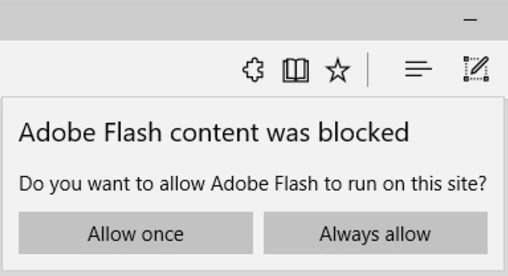
It sounds like you have the Windows 10 Creators Update installed.  To verify go to Settings > System > About.  If Version is 1703 and OS Build is 15063.96 you have the Creators Update.  In this update Microsoft changed the default behaviour of Flash as it moves to preferring HTML5 over Flash in Edge, and setting Flash as click-to-play by default.

Please do the following:

  • Look on the address field.  Is there a puzzle piece?


  • If so, click that to display the 'Adobe Flash content was blocked message,with the option to 'allow once' or 'always allow' for this site
If the puzzle piece is not visible in the address field, do the following:

  • Look for the 'Download Flash' link or the 'Get Adobe Flash Player' button on the page
  • Click on the link or button
  • The 'Adobe Flash content was blocked' message will display
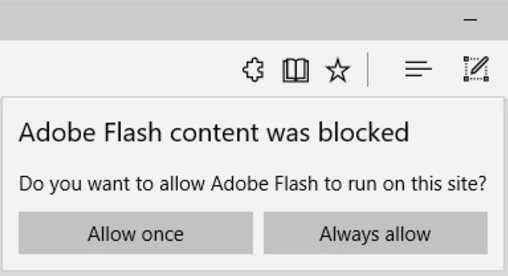
  • Click either 'Allow once' or 'Always Allow'


Note that this new behaviour is per-site, so you will need to do this for other sites that use Flash.  Microsoft does not offer an 'always allow, for all sites' option.  For more information, see Extending User Control of Flash with Click-to-Run - Microsoft Edge Dev BlogMicrosoft Edge Dev Blo

<grammar edit>

3 replies

Participant
September 16, 2019

I am having the same problem


_maria_
Community Manager
_maria_Community ManagerCorrect answer
Community Manager
May 31, 2017

It sounds like you have the Windows 10 Creators Update installed.  To verify go to Settings > System > About.  If Version is 1703 and OS Build is 15063.96 you have the Creators Update.  In this update Microsoft changed the default behaviour of Flash as it moves to preferring HTML5 over Flash in Edge, and setting Flash as click-to-play by default.

Please do the following:

  • Look on the address field.  Is there a puzzle piece?


  • If so, click that to display the 'Adobe Flash content was blocked message,with the option to 'allow once' or 'always allow' for this site

If the puzzle piece is not visible in the address field, do the following:

  • Look for the 'Download Flash' link or the 'Get Adobe Flash Player' button on the page
  • Click on the link or button
  • The 'Adobe Flash content was blocked' message will display
  • Click either 'Allow once' or 'Always Allow'


Note that this new behaviour is per-site, so you will need to do this for other sites that use Flash.  Microsoft does not offer an 'always allow, for all sites' option.  For more information, see Extending User Control of Flash with Click-to-Run - Microsoft Edge Dev BlogMicrosoft Edge Dev Blo

<grammar edit>

edwardp32519285
Participant
June 1, 2017

Hi M Vargas!

Great advice - thanks!! Take it easy!!

Ed

_maria_
Community Manager
Community Manager
June 1, 2017

You're welcome.

ridhij4208356012135538
Adobe Employee
Adobe Employee
May 31, 2017

Hi,

To enable Flash Player for Edge browser please follow steps mentioned on Adobe Flash Player issues with Windows 10 (Microsoft Edge) page.

Thanks!
