Participant
June 13, 2010
Answered

HELP... flash player won't play full screen

  • June 13, 2010
  • 5 replies
  • 19630 views

After a recent update my flash player won't play in full screen it goes full white screen. (firefox)

    This topic has been closed for replies.
    Correct answer pwillener

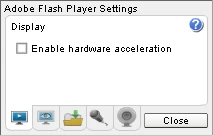
    Update the device drivers for your graphics card, and/or use Flash Player Settings, Display panel, and uncheck 'Enable hardware acceleration'.
    5 replies

    Participant
    February 26, 2011

    I have unchecked the acceleration in the settings tab, and it now works for me.  However, it worked fine in IE, but NOT in Firefox.  Why would it work in one and not the other? I have posted on the Firefox forum, but no answers were forthcoming.

    pwillener
    pwillenerCorrect answer
    Legend
    June 15, 2010

    Update the device drivers for your graphics card, and/or use Flash Player Settings, Display panel, and uncheck 'Enable hardware acceleration'.

    Ashee1Author
    Participant
    June 15, 2010

    THANK YOU, IT WORKED!

    June 14, 2010

    ive re-installed flash 4 times and now its working.

    Ashee1Author
    Participant
    June 14, 2010

    It happens on every web site.

    Participant
    June 25, 2011

    Ashee1 wrote:

    It happens on every web site.

    Double left click the enlarge icon, bingo, worked for me on Wndws- 7

    June 13, 2010

    Glad im not the only one then!

    Participant
    June 14, 2010

    Anyone got the solution for this?I've got the same problem,just getting a blank white screen when I try and enlarge (for instance)a Youtube video.

    I read somewhere that I should uncheck the 'enable hardware acceleration tab in the settings panel,but I can't uncheck it(the tick refuses to f***ing disappear).Driving me nuts!!!!