


TheDude78
Participant
August 6, 2015
Answered

How do I remove the 32-bit version that my wife has installed on my 64-bit Notebook ??

  • August 6, 2015
  • 1 reply
  • 900 views

Hello to all who is reading this post and first of all big thanks for the effort !

So, the question says it all

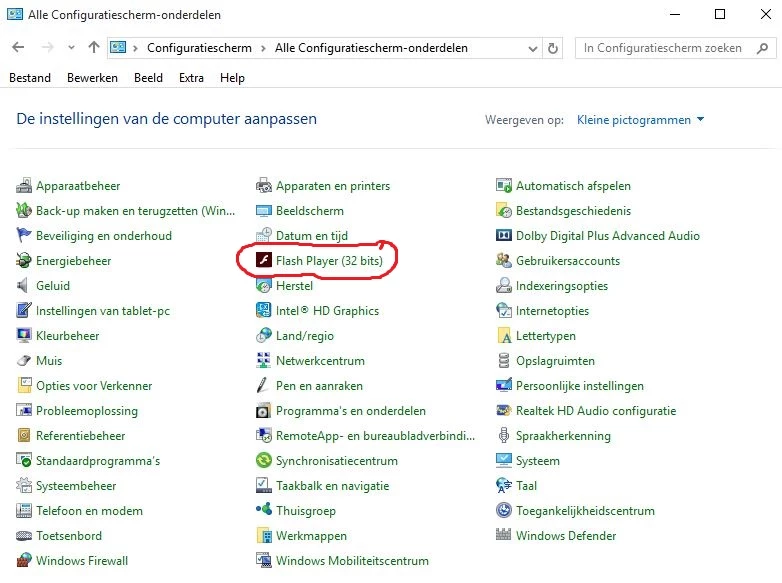
It's weird to me that the icon is visible in the Configuration Screen section

But it's nowhere to be found in the Installed Programs section...

How do I delete this 32-bit version ??

If I open the Flash icon I get a Flash Player Settings Manager pop-up.

At the Updates tab is nothing to be edited what is weird to me also.

I get a warning before an update is installed, that's fine.

NPAPI plug-in = not installed and can not be checked

PPAPI plug-in = not installed and can not be checked

???

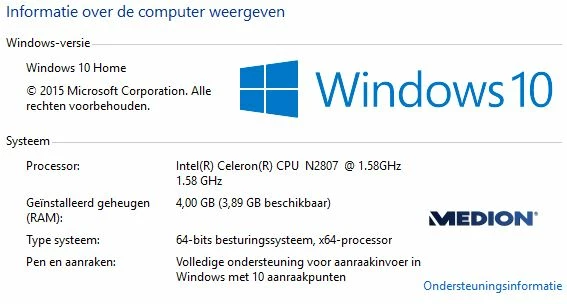
PC Specs below
The screen shot of the Config screen below
This topic has been closed for replies.
Correct answer _maria_

Hi TheDude78,

Flash Player installs both 32-bit and 64-bit versions on 64-bit operating systems.  This is because some browsers (e.g. Firefox, and others) and apps that are still 32-bit version only and if only a 64-bit version then you wouldn't be able to use Flash in those browsers/apps.

The item you are referencing is a universal Settings Manager component that contains various settings options (Local Storage Settings, Camera/Mic, Playback, Updates, and other options) that will affect both the 32-bit and 64-bit versions of the player.


As of Windows 8 (and including Windows 10) Microsoft embeds Flash Player for IE (and Edge in Windows 10) and the Flash Player Settings Manager you are seeing was installed as part of that process.  If you do not have the NPAPI or PPAPI Flash Player plug-in(s) installed the Check Now button for these plug-ins will be disabled (since thee is nothing to check).  Once you install either of these plug-ins the Check Now button will be enabled.

Since Microsoft embeds Flash Player in Windows 8 and above they release Flash Player updates for Edge and IE via Windows Updates and they lock the associated Flash Player (ActiveX) files  to prevent users from removing them.  Manually unlocking these files and deleting them will most likely result in you not being able to re-install Flash Player for Edge and IE short of re-installing the OS to get it back.  To my knowledge, this has been the case with Windows 8.x users who have manually deleted the embedded version of Flash Player for Internet Explorer and will most likely be the case with Windows 10 users who do the same.

--

Maria

1 reply

_maria_
_maria_Correct answer
Legend
August 6, 2015

Hi TheDude78,

Flash Player installs both 32-bit and 64-bit versions on 64-bit operating systems.  This is because some browsers (e.g. Firefox, and others) and apps that are still 32-bit version only and if only a 64-bit version then you wouldn't be able to use Flash in those browsers/apps.

The item you are referencing is a universal Settings Manager component that contains various settings options (Local Storage Settings, Camera/Mic, Playback, Updates, and other options) that will affect both the 32-bit and 64-bit versions of the player.


As of Windows 8 (and including Windows 10) Microsoft embeds Flash Player for IE (and Edge in Windows 10) and the Flash Player Settings Manager you are seeing was installed as part of that process.  If you do not have the NPAPI or PPAPI Flash Player plug-in(s) installed the Check Now button for these plug-ins will be disabled (since thee is nothing to check).  Once you install either of these plug-ins the Check Now button will be enabled.

Since Microsoft embeds Flash Player in Windows 8 and above they release Flash Player updates for Edge and IE via Windows Updates and they lock the associated Flash Player (ActiveX) files  to prevent users from removing them.  Manually unlocking these files and deleting them will most likely result in you not being able to re-install Flash Player for Edge and IE short of re-installing the OS to get it back.  To my knowledge, this has been the case with Windows 8.x users who have manually deleted the embedded version of Flash Player for Internet Explorer and will most likely be the case with Windows 10 users who do the same.

--

Maria

TheDude78
TheDude78Author
Participant
August 7, 2015

Hello m_vargas,

big thanks for the explenation !!

I think I understand the issue

But no way I'm using MS Edge or OneDrive !!

Found together with these two apps so many spyware that's auto-build in and extremely hard to remove !!

There was this site that explained that Edge collected all data of your doings on your pc and sends them to who know including themselves.

Called MS-service but they say those apps are imossible to remove

Makes me sad, I'm paying for this platform and believe in my opinion it's a crime against my privacy.

But I'm getting off-topic now :-)

Hey thnx a lot you've been a big help !!

_maria_
Legend
August 7, 2015

You're welcome, TheDude78

--

Maria