


JayMan
Participating Frequently
September 13, 2017
Answered

How to prevent Update Notifications?

  • September 13, 2017
  • 1 reply
  • 3383 views

For a long time now, we've had mms.cfg deployed to our systems to prevent the Update Notifications appearing for staff; as we manage updates via SCCM. Contents of the mms.cfg file is just "AutoUpdateDisable=1" & we have it deployed to both System32 & SysWow64 versions of the "Macromed\Flash\" folder.

Over the last maybe 6-12months, we've been receiving calls from staff who are still getting the update notifications occasionally. Checking the flash control panel applet, shows that 'never check for updates' is indeed set.

Today I've received the update notification myself, so i'm expecting some calls again today...

The popup window appears to be from the process "FlashUtil64_26_0_0_151_pepper.exe" (or maybe it was FlashUtil32_26_0_0_151_pepper.exe... didn't check, just saw pepper....).
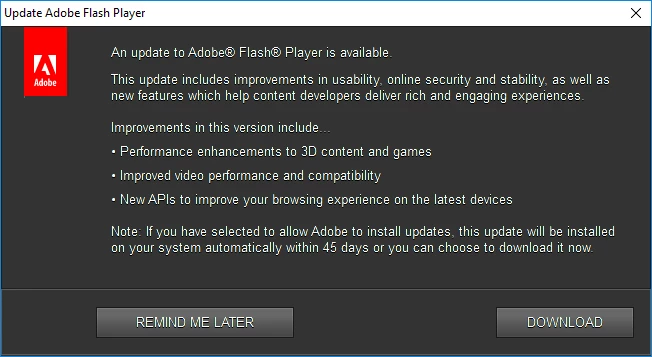
How can we make sure this popup stops happening for our staff?

This topic has been closed for replies.
Correct answer _maria_

Hi Maria,

Thanks for getting back to me. The product is Ivanti Patch (had a typo in my earlier post), this is a SCCM Add-on product used to deploy application updates and is the same product used by Jason who posted the initial question. We are seeing the exact same issue as described by Jason.

Yes we are using mmc.cfg file and it has been uploaded as requested to Adobe Document Cloud with the URL below:

Shared Files - Acrobat.com

It has only one line as below:

AutoUpdateDisable=1

Thanks,

Rojer


Thank you for providing the mms.cfg file.  The behaviour your observing is due to a mms.cfg file encoding (UTF-8 w/BOM) issue.  We recently fixed a bug where the update workflow was not working correctly with mms.cfg files saved in this format.  This bug was fixed in 29.0.0.140. Please upgrade to 29.0.0.140 and/or save the file in ANSI format

1 reply

_maria_
Legend
September 13, 2017

Hi,

I'll need to get some information from you to troubleshoot further.  Please provide the following:

  • Operating System, including version, of an impacted system.
  • What is your deployment procedure?
  • Which install vector (EXE or MSI) do you use to deploy Flash Player?
  • Do you run the standalone uninstaller as part of your deployment procedure?
  • Do you redeploy the mms.cfg file disabling Update Notifications with each deployment?
  • Upload the mms.cfg file from an impacted system to cloud.acrobat.com/send (How to share a document​) and post the link to the uploaded file in your reply.

Thank you.

--

Maria

JayMan
JayManAuthor
Participating Frequently
November 13, 2017

Apologies for the late reply to this, didn't get a notification email for your reply.

-Our PC fleet is mainly Windows 10, but we also have WIn7,8,8.1 which are affected also.

-Initial deployment of flash player is through SCCM using MSI installer

-We deploy updates via SCCM Software Updates, using the Ivanti Patch (formerly called Shavlik) for 3rd party updates

-Standalone Uninstaller is not used in normal processes; only if there is an issue on a computer & we need a clean installation of flash player

-mms.cfg is deployed to all systems via AD Group Policy Preferences & is copied to all systems at start up

-Not sure if you need the file uploaded, its a single line containing just (file has not been modified since 2011):

AutoUpdateDisable=1

Thanks in advance.

Jason