


How to see if a Flash Player update proposal is not a fake one?
I'm getting very regular update proposals of my installed Flash Player.
Sometimes these update proposals are so frequent that I suspect some of them can't be serious ones..
Everytime I see the same window without any information about the update this is
proposing me:
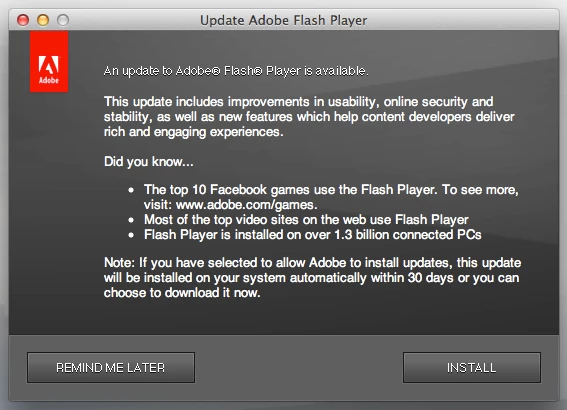
I feel it is pretty too easy to make a fake window of this Flash Player update proposal window.
To build a virus which will pretend to be a Flash Player update, a cybercriminal just need to make
a copy of the always identical Flash Player update proposal window, and fire any sort of crapware download
from there.
I imagine the worldwide success of the Flash Player false updaters is coming from this much too
easy window without any version or new information.
Isn't there a potential target of 1.3 billion connected PC?
How may I recognise if a Flash Player update proposal is an official one or any fake?

 AdChoices