September 16, 2017
Answered

How to set Flashplayer Default AUDIO OUT Program?

  • September 16, 2017
  • 2 replies
  • 680 views

Option just can choose one of the OUT program....do not have default OUT program(Follow win10 OS)
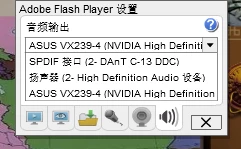
This is the Flashplayer''s option:↑↑↑↑

The right option should be this:↓↓↓
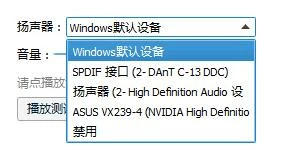
When I play video from IE or EDGE ,If i want change audio out program, I need choose one of then every times on web page rather than change it in win10OS

    This topic has been closed for replies.
    Correct answer _maria_

    Please see Flash Player 27.0.0.130 - Audio Issues for an update on this.  Unfortunately Edge users cannot install the beta release.  If you want to test out the beta, you'll need to install a different browser (e.g. Firefox).

    2 replies

    jeromiec83223024
    Inspiring
    September 28, 2017

    This is resolved in current beta builds.  It should be in the October generally available release.

    You can pick up a copy of the latest beta here:

    http://www.adobe.com/go/flashplayerbeta/

    _maria_
    Legend
    September 18, 2017

    Please refer to the release notes for this new feature: Release Notes Flash Player 27 AIR 27 This may answer your question.

    September 22, 2017

    But my EDGE and Flashplayer was The latest version,I can't solve the question by update

    _maria_
    _maria_Correct answer
    Legend
    September 25, 2017

    Please see Flash Player 27.0.0.130 - Audio Issues for an update on this.  Unfortunately Edge users cannot install the beta release.  If you want to test out the beta, you'll need to install a different browser (e.g. Firefox).