
Participant
November 16, 2018
Question

I can't click on the allow for local storeage for videos.

  • November 16, 2018
  • 2 replies
  • 5005 views

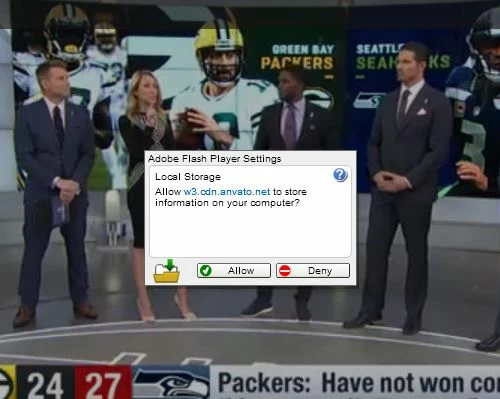
When I watch any videos on internet explorer that are not on youtube I get an Adobe Flash Player Settings Local Storage notification that I can't get rid of.  I am unable to left or right click on it and when I try to click on it the video acts like it is part of the video.  I have attached an image of the error.  Adobe flash is on the latest version and this is on a Windows 7.

    This topic has been closed for replies.

    2 replies

    jeromiec83223024
    Community Manager
    Community Manager
    December 4, 2018

    Yeah, this is the anti-clickjacking logic kicking in.  We do a check to see that the dialog isn't obscured.  When stuff (like video) is moving around on the edges of the dialog, sometimes that creates a false positive and we won't take the click.

    The best way to solve this is to use the storage settings in the native control panel to suppress this dialog.

    Just go to Control Panel > Flash > Storage and either set Allow sites to save information to this computer, or add the host in that dialog to the whitelist by clicking on Local Storage Settings by Site

    Participant
    January 16, 2019

    IE browser display ratio is not 100%

    Robert Mc Dowell
    Legend
    November 16, 2018

    try to select the allow button with TAB and SPACE

    Participant
    November 19, 2018

    Tab and space didn't work.

    Robert Mc Dowell
    Legend
    November 19, 2018

    it recalls me the same behavior long time ago but for cam/mic.What I did if I recall well is to empty the cache (included persistent cache) in your browser, then uninstall completely Flash, reboot and reainstall Flash