Participant
December 26, 2014
Answered

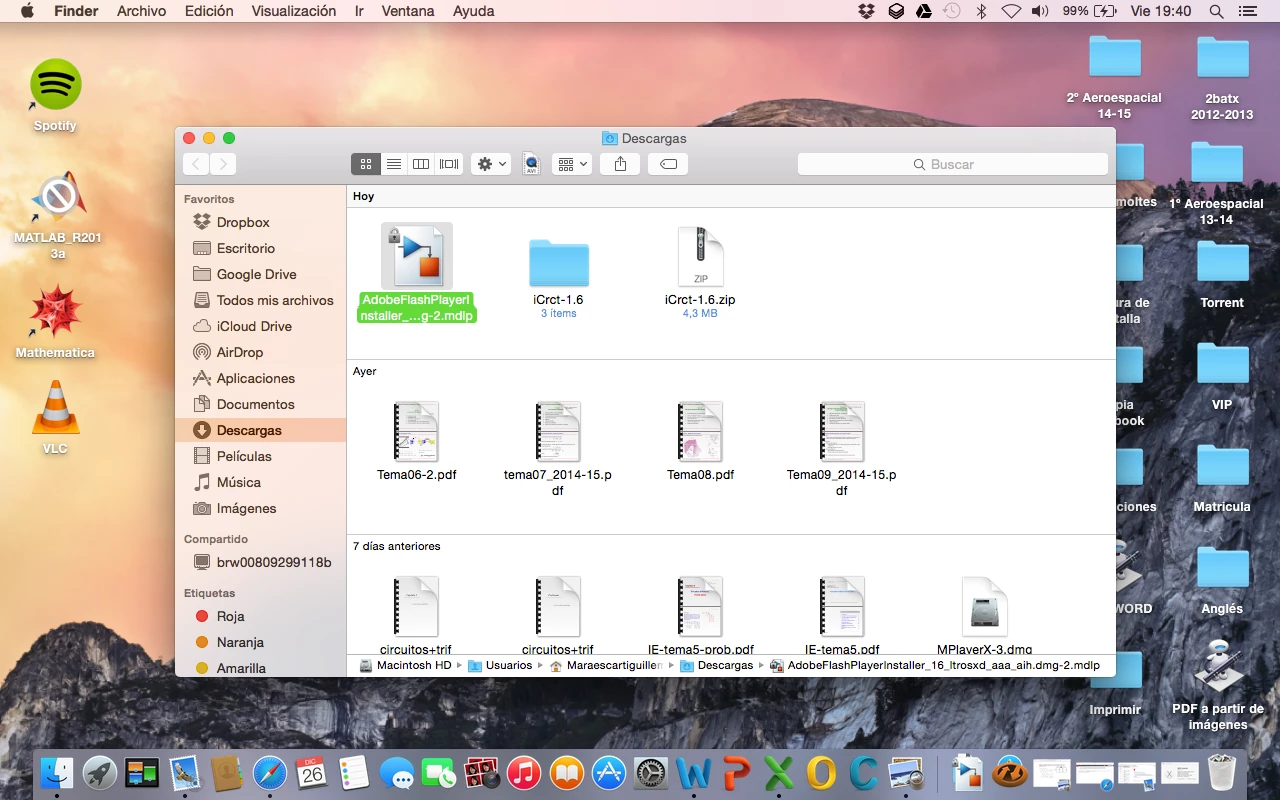
I can't run the installer file because a padlock appears in Mac OS X Yosemite.

  • December 26, 2014
  • 2 replies
  • 364 views

When I download the file it appears on Finder with a padlock in the upper left corner. If I try to run it, it opens with another program that can't read it. Looking for some information on the internet I read something about the file permissions. But I don't know what to do.

Thanks for your time!!

This topic has been closed for replies.
Correct answer _maria_

Hi Maesgui,

In the screenshot, I see that the installer has the .mdlp extension.  Do you by chance have MATLAB installed on your system?

Remove -2.mdlp from the file name and it should leave just the .dmg extension, which should launch.  If it doesn't, right-click on the file and select 'Open With' and navigate to /System/Library/CoreServices/DiskImageMounter.app

--

Maria

2 replies

_maria_
_maria_Correct answer
Legend
January 16, 2015

Hi Maesgui,

In the screenshot, I see that the installer has the .mdlp extension.  Do you by chance have MATLAB installed on your system?

Remove -2.mdlp from the file name and it should leave just the .dmg extension, which should launch.  If it doesn't, right-click on the file and select 'Open With' and navigate to /System/Library/CoreServices/DiskImageMounter.app

--

Maria

maesguiAuthor
Participant
January 17, 2015

Hi evreyone,

In answer to your question m_vargas : yes I have MATLAB installed. By eliminating the extension I could install it.

Thank you very much!

_maria_
Legend
January 19, 2015

Hi maesgui,


Thank you for confirming.  Much appreciated.

--

Maria

Rave
Participating Frequently
January 16, 2015

Hi maesgui,

Try downloading the offline installer from: http://www.adobe.com/in/products/flashplayer/distribution3.html

Regards,

Rave