Brian_Eriksen
Participant
March 28, 2016
解決済み

I Don't Want True Key or anything else. Just Flash, please.

  • March 28, 2016
  • 返信数 9.
  • 32071 ビュー

Hi All,

I just installed the adobe flash player today. When I installed it, it installed something called True Key. I didn't want True Key. I uninstalled it, but will the flash player try to install other software I don't want? I did select "Let adobe install updates", and now I'm afraid the "updates" might include software I didn't want / need / authorize!

Thanks,

-Brian

このトピックへの返信は締め切られました。
解決に役立った回答 _maria_

Hi,

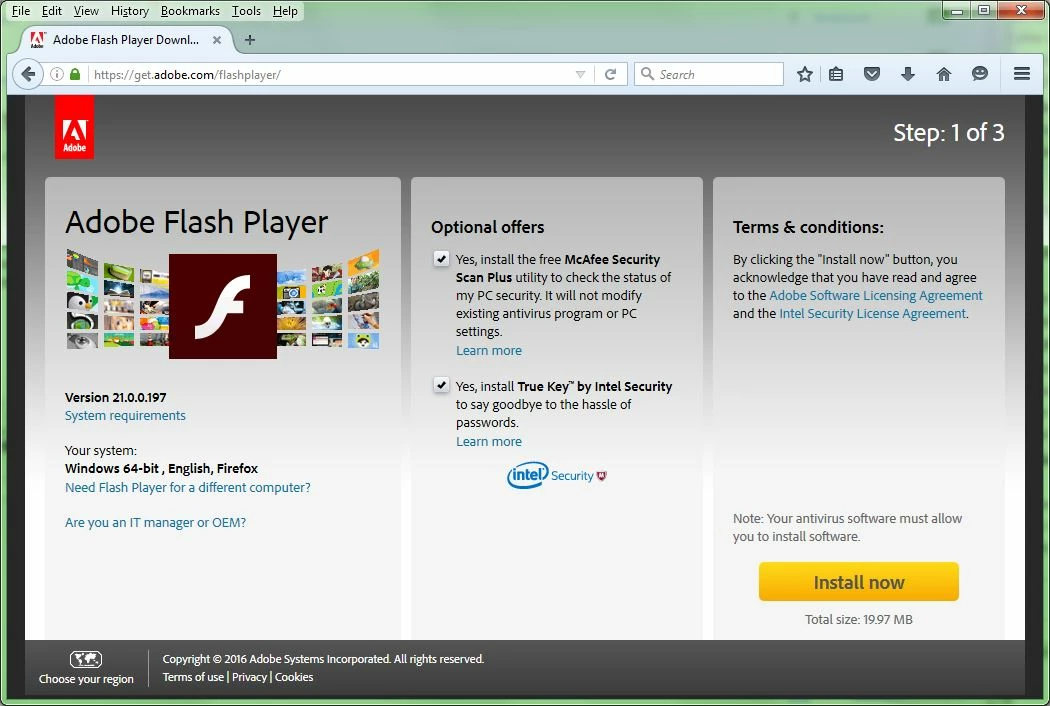
McAfee and True Key are optional offers available on the Flash Player download center.  Users can opt-out of installing these.

If you didn't see the offer, and have ad-blockers installed, it's most likely the reason you didn't see the offer.

Selecting the 'Let Adobe install updates (recommended)' option is the best way to ensure you always have the most recent version of Flash Player installed as Flash Player regularly checks for updates and installs an update within 24 hours of it being released.  When Flash Player updates via this method only the Flash Player is installed.  Option offers are only installed from the main Flash Player download page as users have to select whether or not to install the option offers.

--

Maria

返信数 9

Participant
June 17, 2017

Why should I have to opt out, if it something i want I will opt in for it.

Adobe is now and has been in the business of pushing useless bloatware.

McAfee truly is useless bloatware and will slow down your computer.

Participant
April 5, 2017

Just swapped out an OS today from Vista to Win 7 and had to install Flash...My comp is a bit of a dinosaur but I had an extra key for Win 7 around and figured I would try to upgrade since Vista was crapping out.

There was no option to opt out of True Key and McAfee it showed up during the download progress and was not there before.  At that point it was too late.  I was able to uninstall the McAfee...

The result?  My comp is freezing due to True Key!  Doesn't seem to want to uninstall it from the Control Panel either. This is ridiculous!  You guys should be drawn and quartered!

Participant
April 5, 2017

Actually, was able to remove it via Control Panel in Safe Mode...

ericp70069877
Participant
April 5, 2017

After unknowingly installing True Key during a Flash update it caused my PC to be stuck in a loop at sign-in.  "Visual C++ Runtime Library: "The Application has requested the Runtime to terminate in an unusual way."

Loss of work and waste of time for something I never requested be installed on my machine.  I had to dig for a way to start the Windows Installer service in safe mode in order to uninstall the software.

Default to not installing please.

Participant
March 6, 2017

Maybe the OPTIONAL software should not DEFAULT to a CHECKED status.  This is simply a way to catch users in a hurry and falsely bolster numbers of bloatware installations.  Not to mention the fact that I did not even see the page with these options and the download that completed included the OPTIONAL software.  How low and petty can your marketing methods be.

ridhij4208356012135538
Adobe Employee
Adobe Employee
March 6, 2017

Hi,

If you have javascript disabled or ad-blockers enabled in your system you will not be able to see the optional offers. Once you have installed Flash Player, we recommend you to select "Allow Adobe to install updates". It would automatically update your Flash Player to the latest version and you will not be directed to the offerings page.

Thanks!

Participant
July 12, 2017

Wow. Must we life affirming to support massive trickery and exploitation with the lovely proffesional tone of writing. 

"It is your own fault that you are now encumbered with the annoyance of removing unwanted, unsought-for bloatware.
You should have just opted out. If you had not been a silly little user and only followed these 3 steps, (that you had no way of knowing beforehand) we would not have this problem, now would we?

All you needed to do was simple:
1. enable javascript,

2. disable adblock,

and 3 wait ten seconds for teh scam..- I mean the opt-out options to appear.

It is pretty clear that the fault lies with you, the silly little user and not with the pristine morality of the cooporation.

THANK´S!

Participant
March 1, 2017

@m_vargas I recently attended a software development Microsoft meeting/training that required Flash.

I was reluctant because of past experience (never on my new Surface Pro 4).

None of the caveats you mentioned above apply and the bloatware was installed by default. I'm a software developer, and I'm all about detail. I'm also patient, normally.

Adobe, just stop, please. Do not install bloatware by default. Requiring users to "opt out" or uninstall is not proper or even moral (it is sneaky).

I don't envy you @m_vargas, defending the indefensible. It's life sucking. Please turn whatever energy you may have left toward Adobe who is perpetuating this frustration. It's not right to do what you do, Adobe - install bloatware by default.

Please don't do that.

Known Participant
January 24, 2017

This really makes me angry! The installer does not warn you about True Key at first - that portion of the screen is blank and it only appears after a few seconds. Like probably most people, I had already read the page and clicked on Install before it appeared. I never even saw it the first time, only when I went back and looked.

I have just had to go to great lengths to get this crap off my computer! Adobe should not be bundling crapware by default. They have always been a reputable company which I have always trusted, and I don't expect them to resort to low-down spam like this. What next? Geekbuddy bundled with Adobe software? Enigma SpyHunter? "Bigger penis" offers? Just how low will Adobe sink for cash?

Anything which has to be sneakily "bundled" with other software is obviously not something anyone would ever want on their computer and I would never touch it on that principle alone.

stacyp25809977
Participant
October 10, 2016

I too accidently installed the True Key. When I look in my programs, it is not listed...anywhere. I am guessing that means its bundled. Buggers!  Can I unstall adobe and reinstall without losing access to my docs?

_maria_
Community Manager
Community Manager
October 10, 2016

True Key is not 'bundled'.  It's a completely separate software that installs itself, with Control Panel entry enabling it to be uninstalled.  Removal instructions are available at https://help.truekey.com/hc/en-us/articles/212870718-How-do-I-uninstall-the-True-Key-app-from-my-Windows-device-

June 20, 2016

Au contraire, It's not a fault of ad block software, I'm running vanilla Firefox(no add-ons), about two weeks ago I reformatted my computer, hence me needing the software, and the screen I was shown for "Step 1" was this. (I went back after and rechecked)

try67
Community Expert
Community Expert
June 20, 2016

Maybe they unbundled it from that version? Did you make sure that you did not have TrueKey before, but did have it after the installation?

_maria_
Community Manager
_maria_Community Manager解決!
Community Manager
March 28, 2016

Hi,

McAfee and True Key are optional offers available on the Flash Player download center.  Users can opt-out of installing these.

If you didn't see the offer, and have ad-blockers installed, it's most likely the reason you didn't see the offer.

Selecting the 'Let Adobe install updates (recommended)' option is the best way to ensure you always have the most recent version of Flash Player installed as Flash Player regularly checks for updates and installs an update within 24 hours of it being released.  When Flash Player updates via this method only the Flash Player is installed.  Option offers are only installed from the main Flash Player download page as users have to select whether or not to install the option offers.

--

Maria

May 14, 2016

Nice one, Folks,

I just accidentally installed bloatware on my computer. You guys at Adobe must know that the absolute majority of Flash users not only hate your incompetence which forces us to update regularly. We also need to watch out not get bloatware forced on us. And now the next step: Blaming the user who decides that he doesn't want to be pestered by ads.We need to see ads everythere, otherwise Adobe will not show us the checkboxes whenever we need to downlaoad the newest security upgrade. If I were working for Adobe I'd start searching for a new job now.

As for the bloatware: It'll be uninstalled right after I uninstalled Flash for good. I had Flash for convenience, but nowadays it's not really needed anymore.