Participant
January 18, 2018
Answered

I have installed flash multiple times, but Opera still tells me to update

  • January 18, 2018
  • 2 replies
  • 777 views

Hi Flashy people! I'm what people refer to as a numbskull, I don't understand what Flash is or does, but Opera tells me I need to update it. So I clicked the link, downloaded the .exe, closed opera, installed flash. Restarted opera, but it just tells me to update flash again.

I am using windows 10, Opera verion 50.0.2762.58.  Here is my FlashInstall64.log https://nofile.io/f/MG26uehd4Pt

    This topic has been closed for replies.
    Correct answer _maria_

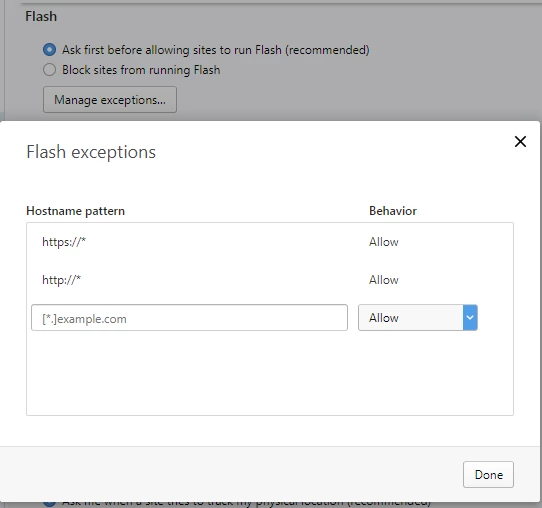
    Please click on the Flash Player 'Manage Exceptions' button and add the domain to the site you want to view Flash content to the list of exceptions.  Alternatively, to whitelist all sites, add https://* and http:// to the list of exceptions, like so:

    <edit>

    Alternatively to white-listing all sites, there is a Site Engagement Index score for each site you visit with Flash.  If this score is not high enough, then Opera blocks Flash.  To view and edit the score, go to opera://site-engagement

    2 replies

    Robert Mc Dowell
    Legend
    January 18, 2018

    You need to install PPAPI plugin, not NPAPI

    ridhij4208356012135538
    Adobe Employee
    Adobe Employee
    January 18, 2018

    Hi,

    What version of Flash Player is installed? To check the version of Flash Player installed, go to  Flash Player Help page and click on "Check Now" button to see the version of Flash Player installed. If the version installed is not 28.0.0.137, then you do not have the latest version of Flash Player. You can go Adobe Flash Player Install for all versions page in Opera browser and download the latest version. Please refer to Enable Flash Player for Opera and Opera 51 adds option to run Flash on All sites | Techdows for settings of Flash Player if you have the latest version installed.

    Thanks!

    bohatir1Author
    Participant
    January 18, 2018

    I have the version you mention. And still it tells me I have to update flash. I have updated it 8 times now.

    Also, there is no such option to run flash on all sites. Here's a screenshot. https://i.imgur.com/SnagGmM.jpg

    _maria_
    _maria_Correct answer
    Legend
    January 18, 2018

    Please click on the Flash Player 'Manage Exceptions' button and add the domain to the site you want to view Flash content to the list of exceptions.  Alternatively, to whitelist all sites, add https://* and http:// to the list of exceptions, like so:

    <edit>

    Alternatively to white-listing all sites, there is a Site Engagement Index score for each site you visit with Flash.  If this score is not high enough, then Opera blocks Flash.  To view and edit the score, go to opera://site-engagement