Participant
December 15, 2012
Question

I have installed flash on my laptop, ie, but computer says no flash is installed. Help!

  • December 15, 2012
  • 1 reply
  • 3121 views

I have Windows Vista SP2, 4gb, 32 bit.    Each time I install Flash 11 (via links) or 11.5 (directly), the screen tells me either I must close IE (task manager says it is closed) or install is complete.  But when I go to the adobe flash site, it says no Adobe Flash has been installed.
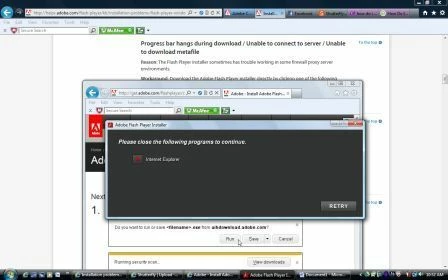
I am running McAfee.  Any idea what I can do?  I would prefer to not use Chrome.

This topic has been closed for replies.

1 reply

VikramGaur
Adobe Employee
Adobe Employee
December 17, 2012

Hello,

Welcome to Adobe Forums.

While running Adobe Flash Player make sure IE is not running.

Launch Task Manager and under process tab there should no process with "iexplore.exe"..

Note : Make sure you click "Show process from all users"

If in case Adobe Flash Player is installed and IE does not play Adobe Flash content then check the Add-on and Active-X filtering (Under Tools)

Thanks,

Vikram

SVnBigOAuthor
Participant
December 17, 2012

Thank you for responding!!


I can check the add-on and ActiveX, but what should I check for?

Stacia

VikramGaur
Adobe Employee
Adobe Employee
December 17, 2012

Make sure Shockwave Flash Object is Enabled (under Tools -> manager add-ons) and Active-X filtering is not checked (Under Tools -> Security)

Thanks,

Vikram