Participant
March 23, 2012
Answered

i have to constantly reinstall flash player every time i open my conputer

  • March 23, 2012
  • 3 replies
  • 24694 views

as the title says, i have to constantly reinstall flash player every time i open my conputer.

can any one help me because this issue is driving me crazy.

    This topic has been closed for replies.
    Correct answer

    The line reads:

    Local Group Memberships  *Administrators  *HomeUsers


    JllyGrnGiant wrote:

    The line reads:

    Local Group Memberships  *Administrators  *HomeUsers

    Could you do the following please.

    1. Click "Start" and then in the search box at the bottom of the menu, type: CMD
    2. When you get the link, right click it and choose "Run As Administrator".
    3. At the prompt, type CD\ and hit Enter. This will take you to the root.
    4. Next, type: net user administrator /active:yes and hit Enter to enable the hidden Administrator account.
    5. Type: EXIT to close the command prompt. 
    6. Reboot the machine and you'll see an additional logon option called Administrator. Choose that and then hit Enter to boot to the desktop (the Aministrator account doesn't have a password by default).
    7. Disable your antivirus to prevent it interfering with the installation. If you have AVAST antivirus, right click the orange icon in systray, go to Avast Shields Control and disable all shields for 1 hour. Otherwise consult this list for instructions on how to disable it: http://www.bleepingcomputer.com/forums/topic114351.html
    8. Next, download Flash for Internet Explorer from here: http://download.macromedia.com/pub/flashplayer/current/install_flash_player_ax_64bit.exe
    9. When you see the prompt, click "Run" to install it immediately.
    10. After the installation completes, open a command prompt again and type: net user administrator /active:no to disable the Administrator account.
    11. Reboot the machine and then open Internet Explorer.
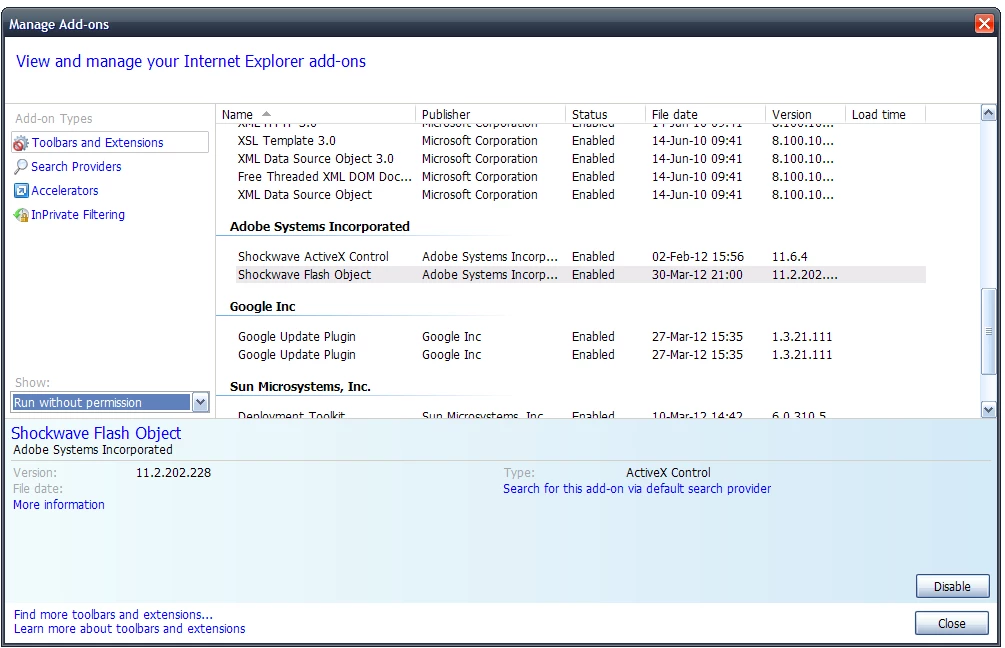
    12. Click "Tools", then "Manage Add-ons".
    13. In the dropdown menu on the left near the bottom (see screenshot), choose "Run without permission".
    14. Scroll down to "Adobe Systems Incorporated" and verify that "Shockwave Flash Object" is installed and enabled. If it's present, but disabled, click the "Enable" button bottom left of that menu.
    15. Finally, re-enable you antivirus and reboot again. Check the "Manage Add-ons" menu to verify that Flash is still present.

    3 replies

    Participating Frequently
    March 28, 2012

    I'm having the same issue (Flash Reader 11.2 r202).

    I'm running Windows 7 64-bit, and regardless if I install Adobe Flash Player for IE 9 or Firefox 11, the installation works only until I restart my computer.  After restarting, sites like youtube don't prompt me to reinstall flash but just show a blank location where the video would play.  The plugins are still installed on the machine and both Firefox and IE still recognize that the plugins are there.  They just don't work.

    I have repeatedly tried uninstalling and reinstalling the flash player and have also tried the recommended step of deleting "HKEY_CLASSES_ROOT\MIME\Database\Content Type\application/x-shockwave-flash" with no success.

    Visiting the website

    http://helpx.adobe.com/flash-player.html

    shows my flash player version after I reinstall flash, but after restarting my machine and visiting the site, neither the version of flash nor an error message is shown.  Only an empty space where the message would go.

    Any help would be greatly appreciated.

    Participating Frequently
    March 28, 2012

    How do I do a clean install of Flash Player?

    After the clean install, do a clean boot.

    Click Start, type System Configuration, click System Configuration, click Selective startup, uncheck Load startup items, click Apply, click Services tab, check Hide all Microsoft Services, click Disable all, click Apply, click OK, click Restart.

    Check to see if Flash Player is still functioning.

    Participating Frequently
    March 29, 2012

    Thank you for the reply.

    Unfortunately the suggestions did not help.

    After running through the complete cleaning process flash was completely disabled (as it should be) so visiting sites like Youtube prompted for me to install flash.  Flash didn't work again until I reinstalled, however I got the same issues as before.  Restarting my computer causes flash to stop sorking.

    But again, thank you for the rely.

    Participant
    March 24, 2012

    i think the problem doesn't exist any more once i deleted the flashinstall log

    but thanks anyways

    chris.campbell
    Community Manager
    Community Manager
    March 24, 2012

    What OS are you using?  If it's windows, could you try the following steps to see if it helps?

    1. Download the current 32 or 64 bit uninstaller appropriate for you OS
    2. Close all browser windows and run the uninstaller
    3. Open regedit and delete the following key: HKEY_CLASSES_ROOT\MIME\Database\Content Type\application/x-shockwave-flash
    4. Install Flash again

    Thanks,

    Chris

    Participant
    March 26, 2012

    i have the same trouble as the above poster, it wont stay installed,  how do i delete " HKEY_CLASSES_ROOT\MIME\Database\Content Type\application/x-shockwave-flash"

    i dont know how to do it... thanks

    March 27, 2012

    Before you go Chris Campbell's route because messing around with the registry can get you into a whole load of trouble if you're not careful (no offence Chris), could you please try running this Microsoft fix which was written to address the problem of not being able to maintain an installation: http://support.microsoft.com/mats/Program_Install_and_Uninstall

    If it doesn't work, post again and I'll provide you with some screenshots to help you delete the key Chris described.