


July 24, 2016
Answered

Impossible to install the latest version of Flash Player on Mac (OS 10.9.5)

  • July 24, 2016
  • 1 reply
  • 541 views

I have been asked to install the latest version of Flash Player on my Mac (OS 10.9.5). First everything went as usual: I downloaded a disk image called "AdobeFlashPlayer_22au_a_install.dmg", and when I click on that I get an "Adobe Flash Player Installer" on my desktop, as usual. When I click on this installer I see the "Install Adobe Flash Player.app". So far so good, but when I click on that Installer app, the following window pops up
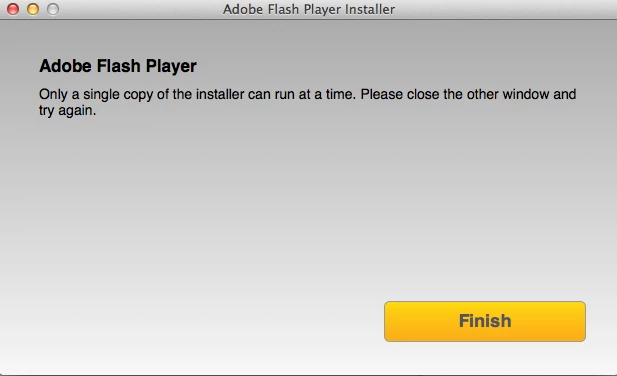
but there is no other window open (I have rebooted my Mac and started the process over, and I get the same message).

When I click on "Finish", I am brought back to the Webpage for downloading the Flash Player installer (which is already on my computer).

Can anyone tell me what might be going wrong here?

Many thanks

Thomas

This topic has been closed for replies.
Correct answer ridhij4208356012135538

Hi,

This window is seen if you have multiple instances of Flash Player installer open and a restart would resolve the issue but since reboot did not resolve the issue may be you do not have the correct update file. Could you open terminal and type md5 /Users/<username>/Downloads/AdobeFlashPlayer_22au_a_install.dmg and see if the value matches 99e3ccf6bc343de051908066ea06248e.

If not, then you do not have the correct Flash Player.Please try downloading the update file from get3.adobe.com/flashplayer.update/osx.

If the problem persists, please let us know.

Thanks!

1 reply

ridhij4208356012135538
Adobe Employee
Adobe Employee
July 25, 2016

Hi,

This window is seen if you have multiple instances of Flash Player installer open and a restart would resolve the issue but since reboot did not resolve the issue may be you do not have the correct update file. Could you open terminal and type md5 /Users/<username>/Downloads/AdobeFlashPlayer_22au_a_install.dmg and see if the value matches 99e3ccf6bc343de051908066ea06248e.

If not, then you do not have the correct Flash Player.Please try downloading the update file from get3.adobe.com/flashplayer.update/osx.

If the problem persists, please let us know.

Thanks!

July 25, 2016

Thanks for your help!

I did what you said, and I get exactly the code that you have given in your message. I redid the process, after rebooting my Mac, and the problem persists in the same form. I would not know why there is another installer running on my Mac.

Thomas