


Known Participant
September 7, 2017
Question

In latest Firefox plugin Flash fonts are broken (new bug)

  • September 7, 2017
  • 3 replies
  • 3287 views

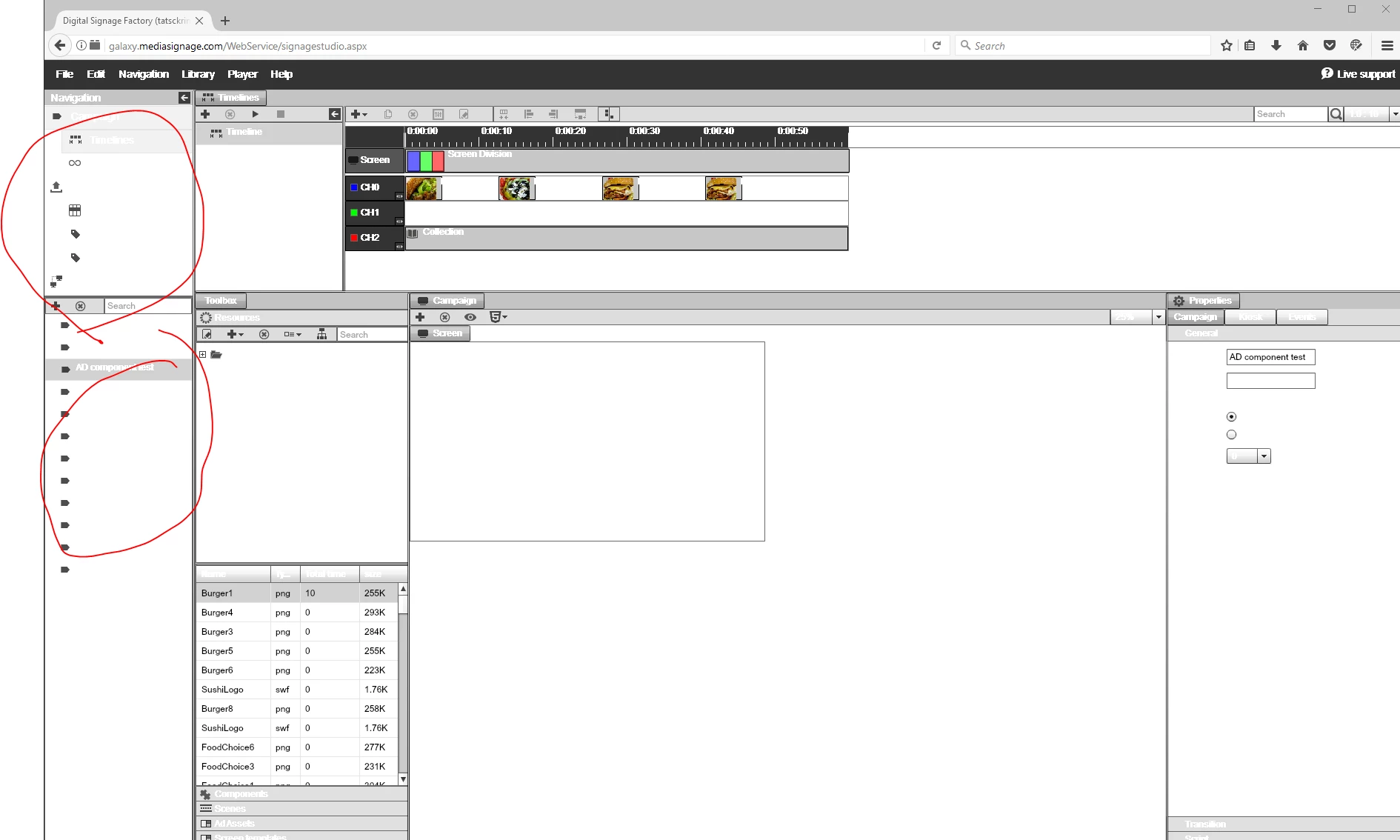
Today Firefox updtaed and now fonts are corrupted in Flash Player.

This is a new bug introduced with latest Firefox update

Windows 64x

Firefox 55.0.3

Please see screen shot

All fonts are now bold and white on white

Adobe please HELP!
regards

Sean

This topic has been closed for replies.

3 replies

Participant
December 14, 2017

I have the same issue: FF 57.0.2 (64bit), FP 28.0 r0, Windows 10.

Fonts are inverted and look ugly.

Amrita Gangwani
Adobe Employee
Adobe Employee
December 14, 2017

Hi,

Can you try disabling 'Async drawing' on Firefox and share your observations?

Steps to disable async drawing in Firefox:

  •      Go to "about:config" on Firefox
  •      Search for 'async' in the search box
  •      Set "dom.ipc.plugins.asyncdrawing.enabled" to false

Meanwhile, we are looking into the issue and suggest you to use Firefox 64 bit instead of 32 bit.

Thanks!

Participant
December 14, 2017

Hi,

thank you for your reply!

Changing this setting to false worked for me, the texts are then displayed as they should. However, please understand that I cannot tell all our customers to change this setting in their browser. In the meanwhile we recommend to our customers to use another browser until this issue can be fixed.

Just to clarify: I am using the 64 bit version of firefox.

Kind regards,

Matthias

jeromiec83223024
Inspiring
September 7, 2017

That behavior is weird, but I don't think it's actually a font problem.  It looks like the font color is inverted, so you're getting white on white.  If you look at the selected areas with the grey backgrounds, you'll see that the text is actually there.  If the font wasn't loading, you'd get nothing at all in that highlighted section, or maybe the missing glyph character (the box with the X across it).

I'm unable to reproduce this using Firefox 56.0b9 (64-bit) or Firefox 55.0.3 64 or 32-bit on Windows 7 with Flash Player 26.0.0.151.  It's possible that they define things like font colors in an asset that just didn't get loaded on the first launch.  Updating the browser also implies that you reloaded the page, so the "fix" of updating to 64-bit might have just been coincidental.

You didn't mention the version of Windows you're using, so I just went with 64-bit Windows 7, since it's the largest population these days...

Born2codeAuthor
Known Participant
September 7, 2017

I am using Windows 10 x64, amd yes you are right on the font inversion.

the problem is now gone, now that I upgraded from 32bit Firefox to 64bit.

I'd like to hope it was just an abnormally ... (fingers crossed)

regards

jeromiec83223024
Inspiring
September 8, 2017

Please definitely let us know if this pops up again.  I definitely ran into a situation on their site where one of their CSS files didn't load on the first try, but the second load got everything working.  It seems similar to what you were seeing with the Flash content.

_maria_
Legend
September 7, 2017

Did you have the same version of Flash Player before and after the Firefox update?

Born2codeAuthor
Known Participant
September 7, 2017

tx for reply...

I had FF 32bit, now installed FF 64bit and the problem is gone.

I will update if I find out more info

tx again,

Sean