


Participant
May 15, 2021
Answered

Incomplete uninstall of FlashPlayer

  • May 15, 2021
  • 4 replies
  • 2516 views

I am having problems re-installing an old HP printer on a Windows 10 64bit desktop because it fails due to a possible conflict with Registry Key"

    HKEY_LOCAL_MACHINE\SOFTWARE\Macromedia\FlashPlayer\SafeVersions

I have run the Adobe uninstall_flash_player.exe several times but this key is still present. I cannot delete it, either using RegEdit or in a CMD window despite having full access permissions as adminitrator.

Please can anyone help me?

T.I.A.

Nick Wilkinson.
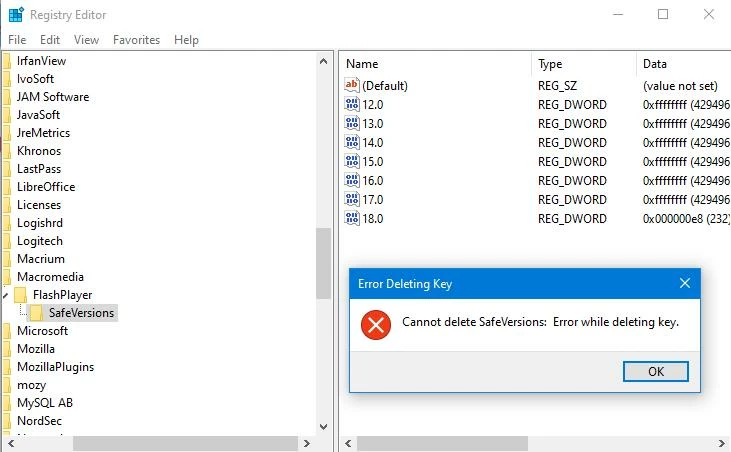


This topic has been closed for replies.
Correct answer _maria_

Those entries were never locked by Flash Player and could be deleted at any time.  If you're getting a permission error attempting to delete it then there's something wrong with Windows registry permissions not caused by Flash Player.  Troubleshooting Windows registry issues is beyond the scope of this Adobe forum.

4 replies

_maria_
Community Manager
_maria_Community ManagerCorrect answer
Community Manager
May 18, 2021

Those entries were never locked by Flash Player and could be deleted at any time.  If you're getting a permission error attempting to delete it then there's something wrong with Windows registry permissions not caused by Flash Player.  Troubleshooting Windows registry issues is beyond the scope of this Adobe forum.

Peru Bob
Community Expert
Community Expert
May 16, 2021

What printer model number?

Which printer driver?

Participant
May 17, 2021

HP OfficeJet 4580.


Participant
May 17, 2021

I should add that all drivers are up to date as per GetMyDrivers.

Participant
May 16, 2021

I have already run the uninstall programme 3 times but no joy. 😞

kglad
Community Expert
Community Expert
May 16, 2021

contact ms re: why you can't use regedit to delete macromedia. 

Participant
May 16, 2021

I have done but no (useful) reply yet.