



Chalky1995
Participant
September 26, 2016
Answered

Infinate Loading in Salesforce after version 23.0.0.162

  • September 26, 2016
  • 1 reply
  • 702 views

Since the update last week to V23.0.0.162, our users are no longer able to use our Salesforce CRM system, in IE11.

After a few days of investigating, we pinpointed the problem to be the latest update of Flash, v23.0.0.162.

Reading the forums I noted similar issues relating to Safari and Gaming users and pointing to the Beta version v23.0.0.181.  I have tried this today, and this does NOT solve the issue.

Issue: When using Salesforce Classic UI, when any lists are opened on the screen they hang with a "Loading..."  message in the window.
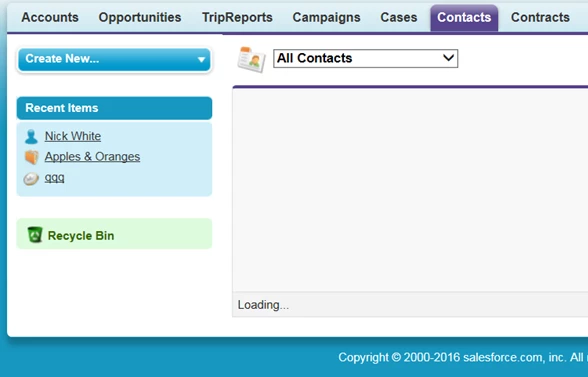
When checking the script, we find the following Error message:

'Could not complete the operation due to error 8070000c.'

Quite simply, we disable the add-on in IE11 and it works, we enable it again, and it does not.  Tested on many PC's within Europe we are clear this is the cause.

Note: Our PC's are working on Windows 7 Professional SP1

This is an urgent issue, as it is preventing our users from using our Company CRM system in IE11, temporary workarounds are to use Firefox where the issue does not present itself, but this is not our company global standard.

Any advise on when this issue may be fixed, will be appreciated.

This topic has been closed for replies.
Correct answer Chalky1995

We have found the issue.

In the config file, mms.cfg, we had a setting localfilereaddisable = 1. This prevents local SWF files from having read access to files on local hard drives.  This was passed to all our PC's in Europe in the latest ZENworks bundle for Adobe.

This is what has been causing this issue, if we remove/disable this option then the issue is resolved.

We have tested this extensively, and been able to replicate this issue with colleagues globally now, whereas before this issue was confined to our PC's in Europe.

1 reply

jeromiec83223024
Inspiring
September 27, 2016

The message you're pointing to is a JavaScript error.  I have no idea what it means.  It's somebody's internal error code, but not ours.

You can try running the content using a Content Debugger version of Flash Player.  The normal Flash Player suppresses error messages, so the debugger might provide some useful clue as to why you're encountering this behavior.

Ultimately, the way that we're actually going to figure this out is by reproducing the scenario directly, under a C++ debugger.  This means that we need to be able to reproduce the problem, which means that we need to be able to access content that demonstrates the issue.

If you can give us a demo acccount, great; however, I imagine that this information is confidential, and probably not something you can provide us with direct access to.  In that instance, my recommendation would be to talk to Salesforce support directly.  If they debug it and determine that it's our bug, they're probably in a better position to provide us with a reproducible example.

Alternatively, if your organization has an enterprise support agreement with Adobe, I'd recommend escalating the issue through your dedicated support rep.

You're more than welcome to send the Salesforce folks to this thread, and they can private message me directly by clicking the link on my name.  I'll be happy to loop them in with direct contacts and stuff.

Thanks!

Chalky1995
Chalky1995AuthorCorrect answer
Participant
October 3, 2016

We have found the issue.

In the config file, mms.cfg, we had a setting localfilereaddisable = 1. This prevents local SWF files from having read access to files on local hard drives.  This was passed to all our PC's in Europe in the latest ZENworks bundle for Adobe.

This is what has been causing this issue, if we remove/disable this option then the issue is resolved.

We have tested this extensively, and been able to replicate this issue with colleagues globally now, whereas before this issue was confined to our PC's in Europe.