


jasonc76700448
Participant
August 10, 2018
Question

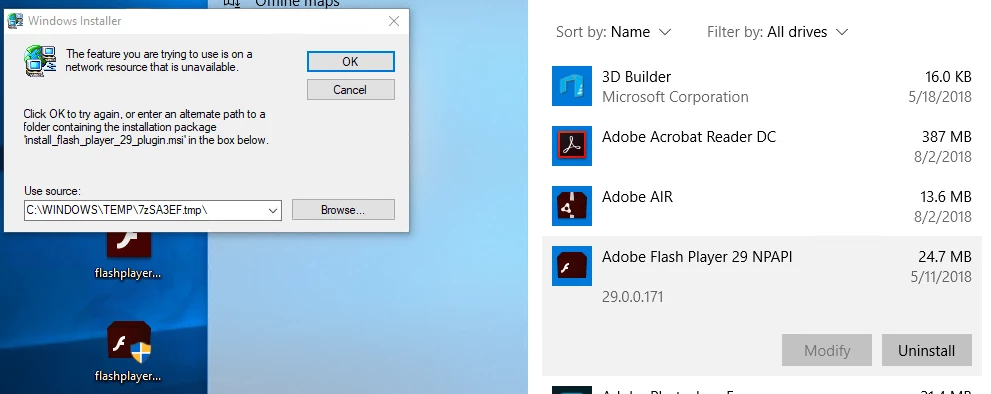
install_flash_player_29_plugin.msi is missing warning when trying to uninstall flash player

  • August 10, 2018
  • 1 reply
  • 1350 views

I have 4 machines that I am trying to uninstall Flash player -- All have different versions, but the symptoms are the same. I cannot uninstall and this dialog box pops up asking for me to find a file in C:\Windows\TEMP
This topic has been closed for replies.

1 reply

jeromiec83223024
Inspiring
August 13, 2018

You might be able to work around this by running our uninstaller.

Uninstall Flash Player - Windows:

https://helpx.adobe.com/flash-player/kb/uninstall-flash-player-windows.html

In general, we only make MSI installers available to enterprise organizations with a distribution agreement.  Those installations are typically managed through a enterprise deployment mechanism.

https://wwwimages2.adobe.com/content/dam/acom/en/devnet/flashplayer/articles/flash_player_admin_guide/pdf/flash_player_3…

This isn't my area of expertise, but my guess is that you're running into a situation where these installations were centrally deployed, with the expectation that they'd be centrally managed.

jasonc76700448
Participant
August 29, 2018

I do not know these 4 out of our 100+ ended up on an MSI version. Maybe it installed as a part of another program. The typical uninstall_flash_player completes without error, but does not remove my msi versions. Google is full of these links, but the file(s) have been taken down.

http://fpdownload.macromedia.com/get/flashplayer/pdc/28.0.0.126/install_flash_player_28_plugin.msi

_maria_
Legend
August 29, 2018
uninstall_flash_player completes without error, but does not remove my msi

Are you using the lastet uninstaller?  Each MSI installer has its own MSI GUID and the uninstaller is updated with the new MSI GUIDs with each release.  Please ensure you're using the most recent uninstaller, posted at Uninstall Flash Player for Windows