


Install Flash Player on Windows 7, NOT BROWSER
Hello
I'd like to install flash player on my computer, but NOT on my browser! I use google chrome, so I know it already has the latest version. The problem is that I have some .swf files that I need to run within windows itself, and I'd much prefer not to run them using google chrome or another browser. I've looked all over the web for a version of flash player that is downloaded separately. I had to use internet explorer and go to the adobe website, since google chrome absolutely refused to let me download anything, as for some reason it believes itself to be all-sufficient. The file installed successfully, but when I run my .swf's, I still get errors, and the flash version still says Version 10.
I've looked around these forums, and tried the "offline version" that was suggested so many times to other people, this thing ==> "install_flash_player_ax", but it was the same: successful installation, no change to my flash player. I looked around in the program files, but couldn't find an .exe in the Adobe folder.
I would greatly appreciate any help! Thanks.
Here are the stats:
- Your operating system & version: Windows 7 Family Edition Premium
- Your web browser(s) & version: Google Chrome 39.0.2171.99 m <== but this isn't the problem though! It has nothing to do with my problem.
- Your Flash Player version: (16.0.0.257) <== Ok now this is what I get from "Flash Player Help" but that isn't really relevant, I think.
- If you get error messages, please quote them exactly, or provide a screenshot:
...so as you can see, it says "Version 10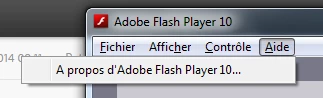 ", not even 10.59.whatever.number...

 AdChoices