
meganz61034140
Participant
March 1, 2017
Question

'installation failed' error when installing Flash Player - OS X

  • March 1, 2017
  • 1 reply
  • 336 views

I am trying to create a PDF presentation in Indesign with interactive and video elements. I have downloaded the most up-to-date version of Adobe Reader and I keep getting the following error. I have attempted to update my flash player and get the following error. I am running Mac OS X and machine can't be update any further. Is there a work around for this?

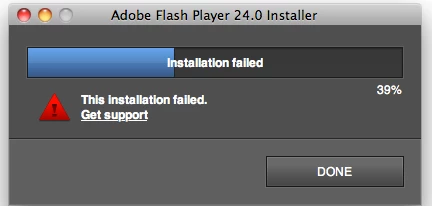
This topic has been closed for replies.

1 reply

_maria_
Legend
March 1, 2017

Hi,

I changed the title of your post to reflect the true issue you are reporting.


What OS X version is this on?

In order to troubleshoot the error, I'll need to obtain the Flash Player install log files.  Please do the following:

  1. Review the FAQ Where do I find the Flash Player installation log on the Macintosh?
  2. After reviewing the FAQ, configure your system to capture the install.log and FlashPlayerInstallManager.log files (ignore the Adobe_ADM.log and Adobe_GDE.log files).
  3. Once the system is configured to capture the logs, run the installer again
  4. When the installation fails click DONE to close the installer window
  5. Save the captured log files according to the instructions in the FAQ
  6. Upload the files to cloud.acrobat.com/send using the instructions at How to share a document
  7. Post the link to the uploaded files in your reply.

Thank you.

--

Maria

meganz61034140
Participant
March 1, 2017

Here is a link to the log files.

Shared Files - Acrobat.com

I am running Mac OS 10.6.8

Thank you Maria

_maria_
Legend
March 1, 2017

Was there anything written to the install.log file during the installation attempt?

What version of Flash Player, if any, is currently installed?