Participant
February 12, 2014
Answered

Installation of Flash Player will not complete

  • February 12, 2014
  • 1 reply
  • 1177 views

I have a Mac version 10.9

Processor 2.5 GHz Intel Core

Safari Version 7.0.1

I have read many discussions related to my issue. I have tried Uninstalling any and all versions of Adobe and then doing a clean download and nothing has helped. I get to 50% and then a general download error pops up. I don't know if this has any correlation, but I didn't have a problem until I updated my software to OS X Mavericks.
This topic has been closed for replies.
Correct answer C_F_McBlob

I have the 10.9 and I have done process above with the secret files download and the Mach kernel file appears, but did not change the error message.


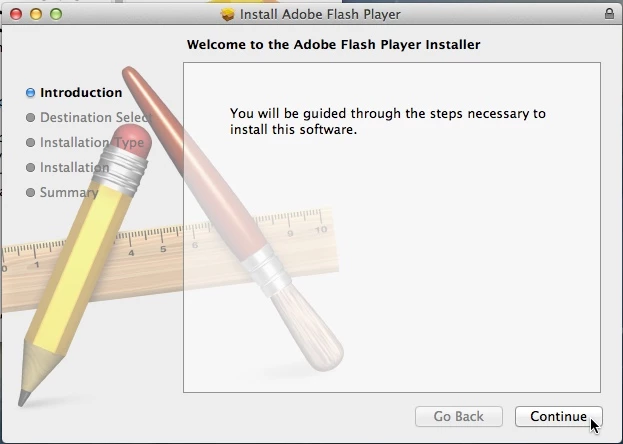
Download the FULL Installer: Flash Player 12.0.0.44 (Mac OS X)

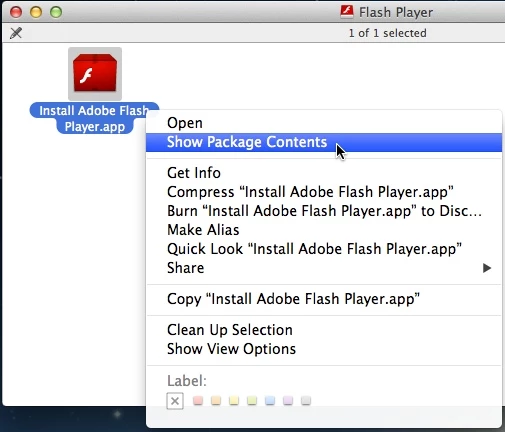
Save the file, quit your browser and mount the DMG.

DO NOT RUN the installer.

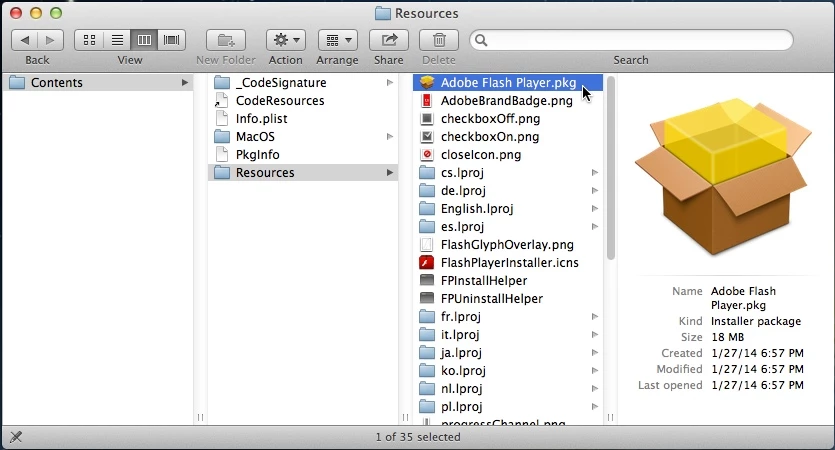
Right click and choose "Show Package Contents"

Then in Contents/Resources, double click the Adobe Flash Player.pkg

and run the COCOA installer

1 reply

C_F_McBlob
Inspiring
February 13, 2014

Don't see this with Mavericks. It's a Mt. Lion issue, but is THIS what you're seeing?

Specifically, a "General Installation Error"?

Participant
February 13, 2014

Yes that is the error message I get.

C_F_McBlob
Inspiring
February 13, 2014

Download this file Secrets Preference Pane

Install Secrets, and open your System Preferences.

Open the Secrets Preference Pane, and check "Show hidden files"

You'll need to press the "Quit this" button,

and restart Finder, by right clicking the Dock icon.

The go to your Mac HD directory and look for the "mach_kernel" file.

It'll be "faded" because it's a hidden file.

If it isn't there, post back.