March 29, 2017
Question

Is there a way to detect the minimum version of flash required for FireFox and Safari?

  • March 29, 2017
  • 1 reply
  • 1369 views

Context:

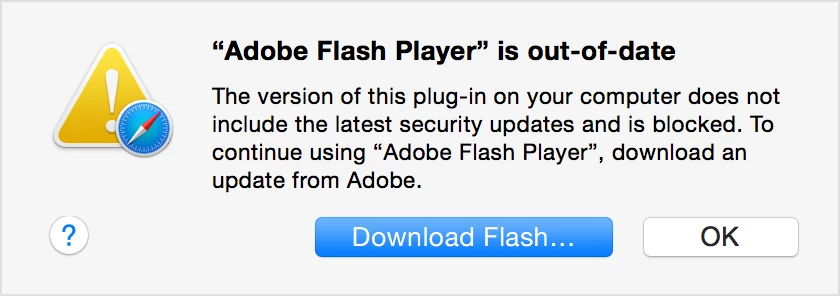
Since FireFox and Safari do not have embedded flash support and rely on flash being installed, it is possible for flash to be out of date and for the browsers to block flash because it does not meet their minimum requirements.

We currently support FireFox versions v45+, and Safari v9+, and I currently do not see a way of being able to systematically detect if the flash version installed meets the minimum requirements or not?

Questions:

If I can detect the current flash version via navigator.plugins, is there a way to dynamically interpret that the version is too low in FF or Safari for the current browser version?

If not, and we have to maintain some elaborate lookup table, matching browser versions to minimum supported flash versions, is the information of what the minimum versions are for FF and Safari versions, available anywhere in the community? If not, can that initiative be started here, since it would benefit from crowd sourcing?

Example below is from Safari (FireFox does the same thing):

    This topic has been closed for replies.

    1 reply

    _maria_
    Legend
    March 29, 2017

    Hi,

    The browser vendor, not Adobe, is the one who determines when to set a version of Flash Player as out-of-date.  What you can do is compare the Flash version in navigator.plugins to the latest version of Flash using the masterversion.xml file we make available and update with every release of Flash.  If the version reported in navigator.plugins is lower than the version listed in masterversion.xml file then you can prompt the user to update Flash Player, or if you have a current distribution license you can deploy Flash Player directly.  Information on licensing and deploying Flash Player is available in the Flash Player Administrator's Guide.  Also, the Flash Player normal release cadence is the second Tuesday of the month.

    --

    Maria

    March 29, 2017

    Hi Maria,

    Thanks for the quick response, and the useful links. I'm aware that the browser is the one that dictates that minimum version, however, using the latest version as litmus might be too conservative, because the browser vendors are likely more lenient. I will pose this question to FireFox and Safari, and I'll share my response if I receive any insights.

    If anyone in the community can chime in on this, or share their strategy on this topic, that would be great.

    @Maria I have an unrelated question about your version numbers -- I see two different versions for a given release, for example 11.2.202.644 and 23.0.0.207.​ Why are these two different, and when detecting a minimum version on the browser, what version should I be using?

    _maria_
    Legend
    March 29, 2017

    11.2 was Linux only.  We've since move linux to the same version as Mac and Windows.  More information is available at Beta News – Flash Player NPAPI for Linux

    I can't tell you what minimum version you should detect for a browser.   Any number of versions will work with the latest browsers, but a browser vendor can block old versions at any time.  The best advise I can give you is to ALWAYS run the latest version of Flash Player.  This ensures you always have the latest, most secure, version.