

Cactus Cowboy
Inspiring
January 29, 2017
Answered

Is this a legitimate Adobe update alert?

  • January 29, 2017
  • 1 reply
  • 2182 views

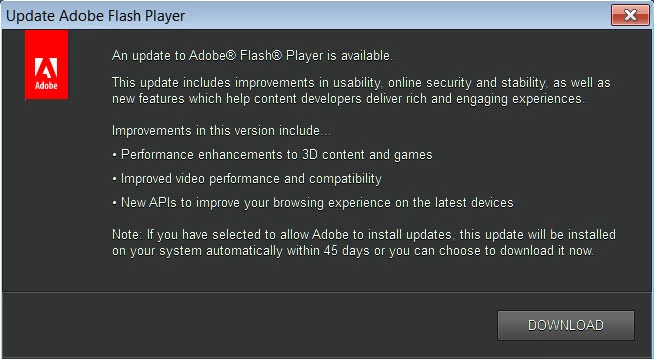
I keep getting this Adobe alert whenever I reboot or cold start my system. I've heard that there's a lot of scams and malware masquerading as legit software updates. My Chrome browser shows it's flash player plugin is up to date so why am I getting this notice? I haven't installed it yet. What should I do and how can I prove it as legit can someone help me?
This topic has been closed for replies.
Correct answer _maria_

Hi,

Yes, that does appear to be a legitimate Flash Player update notification.  Do you use any other browsers, besides Chrome?  If so, it's possible Flash Player for that browser is out of date and is the one triggering the update notification.  Please do the following:

  1. Go to Control Panel > All Control Panel Items
  2. Click on the Flash Player item
  3. When Flash Player Settings Manager displays go to the Updates tab
  4. Post a screenshot of the results (See How do I attach a screenshot?)

Thank you.

--

Maria

1 reply

_maria_
_maria_Correct answer
Legend
January 30, 2017

Hi,

Yes, that does appear to be a legitimate Flash Player update notification.  Do you use any other browsers, besides Chrome?  If so, it's possible Flash Player for that browser is out of date and is the one triggering the update notification.  Please do the following:

  1. Go to Control Panel > All Control Panel Items
  2. Click on the Flash Player item
  3. When Flash Player Settings Manager displays go to the Updates tab
  4. Post a screenshot of the results (See How do I attach a screenshot?)

Thank you.

--

Maria

Cactus Cowboy
Inspiring
January 30, 2017

Thank you. Yes you were correct it was a legit notice. I did as you instructed to the numbers and the results are in the screenshots below. What I don't understand is that Chrome was up to date but it wasn't showing the control panel as such. So I download it as well and life is back to normal. I'm always leary of any install notices. I've been burned real bad once and had to do a complete format and reinstall of my system. Don't want to have to do that again if I can avoid it.

Cactus Cowboy
Inspiring
January 30, 2017

I just figured it out, Chrome is up to date because it's embed and updates itself. Whereas, these updates are for FireFox and IE only. That's why I was getting the notice. I'll have to remember that as Adobe continues to update the software in the future. Again, thank you very much for help.