


Participant
May 4, 2021
Answered

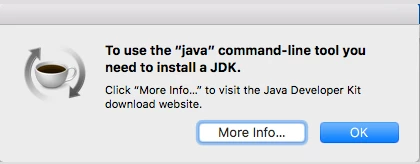
"java" command-line tool pop-up

  • May 4, 2021
  • 2 replies
  • 1935 views

No matter how many times I've tried to uninstall Flash Player on my MacBook Pro MacOS Sierra 10.16.6 I am still getting the popup I am attaching here. Any way how to get rid of this problem? When clicking More info.... it tells me end of life and how to remove the Flash Player but to no avail. Thanks
    This topic has been closed for replies.
    Correct answer _maria_

    I moved your post to a new discussion topic as it's not related to the topic you posted to.


    This is a Java pop-up window and not related to Flash Player at all. You'll need to go to the Java help forums for assistance with this pop-up.


    This thread, https://community.adobe.com/t5/flash-player/pop-up-saying-to-use-the-quot-java-quot-command-tool-you-need-to-install-a-jdk/td-p/11661336, might be of assistance.

    2 replies

    Nancy OShea
    Community Expert
    Community Expert
    May 4, 2021

    Java has nothing to do with Flash Player and vice versa.


    At one time, a Java plugin was required to access certain websites. The browsers stopped supporting Java plugins about 4 years ago along with Silverlight, Shockwave and others.  So you won't find much Java on the web these days.  It's obsolete now the same as Flash Player.


    Nancy O'Shea— Product User & Community Expert
    _maria_
    Community Manager
    _maria_Community ManagerCorrect answer
    Community Manager
    May 4, 2021

    I moved your post to a new discussion topic as it's not related to the topic you posted to.


    This is a Java pop-up window and not related to Flash Player at all. You'll need to go to the Java help forums for assistance with this pop-up.


    This thread, https://community.adobe.com/t5/flash-player/pop-up-saying-to-use-the-quot-java-quot-command-tool-you-need-to-install-a-jdk/td-p/11661336, might be of assistance.