


mms.cfg configured but still getting intermitent Flash Player Update prompt
Dear Experts:
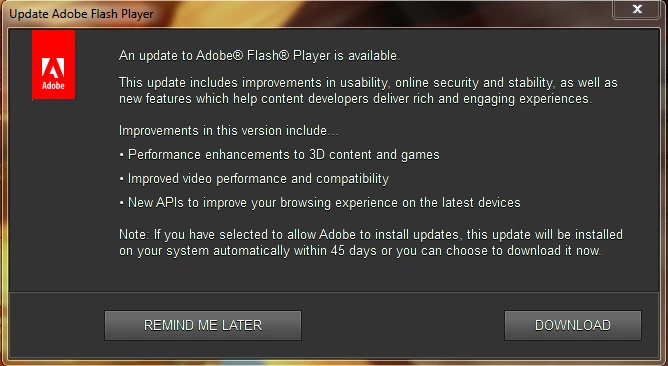
I need help to stop Flash Player Updater prompt. I have been deploying Flash Player for 2 years via SCCM 2012 with no issues. Starting 2017 January release, the mms.cfg does not seems to work anymore.
My Scenario:
Windows 7 x64
Flash Player 24.0.0.221 (outdated)
mms.cfg located in C:\Windows\Syswow64\Macromed\Flash And C:\Windows\System32\Macromed\Flash (solution found in other Adobe Forum thread)
mms.cfg settings:
AutoUpdateDisable=1
SilentAutoUpdateEnable=0
I have done:
- removed the Flash Player Settings Manager from Control Panel,
- removed Task scheduler "Adobe Flash Player Updater".
- Adobe Flash Player Updater set to "Manual" in Services.msc.
Despite all the above being done, I still have standard users complain on intermittent prompt for Flash Player update. It did stopped the prompt when I placed mms.cfg into System32\macromed\Flash folder last month before deploying 24.0.0.221. However, starting March, when version 25.0.0.127 was released, the same user starts getting the same update prompt again. I could not simulate the prompt nor find any other solutions from other forums. Did read something about Background Update Service. How do I completely stop it? Please help.
 AdChoices