
fengy12353241
Known Participant
December 15, 2016
Question

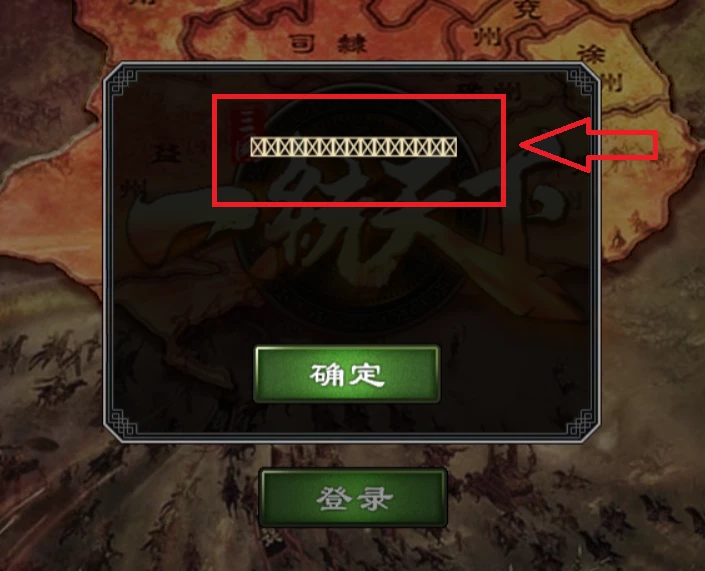
My flash game can not show text correctly in Chrome and Windows10 system.

  • December 15, 2016
  • 1 reply
  • 657 views

Hi,

My flash game can not show text correctly in Chrome and Windows10 system. But my game running in IE and Win10 is right. The problem like follows.

How can I solve this problem?

Thank you.
    This topic has been closed for replies.

    1 reply

    Vivek Negi
    Adobe Employee
    Adobe Employee
    December 15, 2016

    Hi Feng,

    Please provide us few details so that we can help your better.

    1) web link to your game.

    2) Which flash version are you currently noticing this behaviour in.( if is not latest 24.0.0.186 please update your chrome browser and verify)

    -Vivek

    Adobe Flash Runtime Team.

    fengy12353241
    Known Participant
    December 16, 2016

    Hi Vivek,

    Thank you for your reply.

    The test link is: http://cnss.yt.feidou.com/

    Problem system: Windows 10, other system is OK.

    Problem Browser: Google Chrome. My IE is OK.

    About Flash Player, both of 24.0.0.186 and other previous versions are not right.

    So I think the problem happened when I use Chrome in Windows 10. Have no relationship with the version of Flash.

    If you want to test my game. You should have right cookie to login to the 飞豆网_开心网 .

    After you login to the website, you can go to http://cnss.yt.feidou.com to login to the game.

    jeromiec83223024
    Inspiring
    December 20, 2016

    The problem here is that the font you're using isn't available in Chrome, and for whatever reason, it isn't falling back to a system font.

    The easiest solution would be to embed the font you're using into the SWF.  This would make the file size larger, but would ensure that your text is displayed consistently across platforms and browsers.