

angelafe
Participant
September 28, 2017
Question

Need permission to delete flash player file

  • September 28, 2017
  • 1 reply
  • 1566 views

Windows 10

64 bit

Firefox 55.0.3

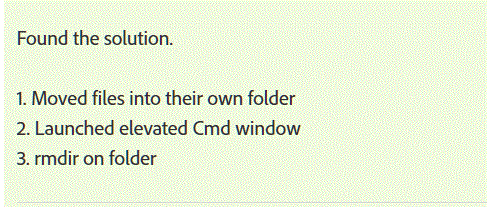
A previous user also needed permission to delete the file below. The solution was

to do the 3 steps. How is that done?
    This topic has been closed for replies.

    1 reply

    _maria_
    Legend
    September 28, 2017

    The files in your screenshot are Microsoft's embedded version of Flash Player ActiveX for IE and Edge.  They are NOT for Firefox.  Since Microsoft embeds Flash Player ActiveX in IE/Edge it's considered a component of the browsers and the files are locked for deletion.  Deleting these files will result in Flash Player ActiveX not being installed/working on IE/Edge.  Deleting these files will result in negative consequences as there isn't a Flash Player ActiveX installer for Windows 10, again, due to it being embedded in the browser by Microsoft.

    angelafe
    angelafeAuthor
    Participant
    September 28, 2017

    OK, so I dont need to do anything then? I can go ahead and reinstall Flash Player?

    jeromiec83223024
    Inspiring
    September 28, 2017

    Yes and no.  By force deleting the files above, you've broken Internet Explorer and Edge.  Because Flash Player is a built in component of Internet Explorer and Edge, there's no separate installer that will reinstall those files.  You can usually get away with uninstalling and reinstalling the last Windows Update for either IE and Edge, or Flash Player, and wind up at a working configuration.

    In terms of Firefox, you can totally run the installer.  IE and Edge use a totally different plug-in technology, and the Flash Player used for Firefox is totally different software from the one that works for IE and Edge (and the one that works for Chrome is distinct from those...).

    That said, it sounds like you were probably trying to solve a specific problem, and I'm doubtful that deleting those files actually helped.

    If the problem you were trying to address persists after reinstalling, it would probably be helpful to back up and describe the symptoms that you're trying to address with the uninstall/reinstall.

