Participant
August 20, 2012
Answered

New Flash Player fails to install. Installer fails to initialize

  • August 20, 2012
  • 1 reply
  • 3228 views

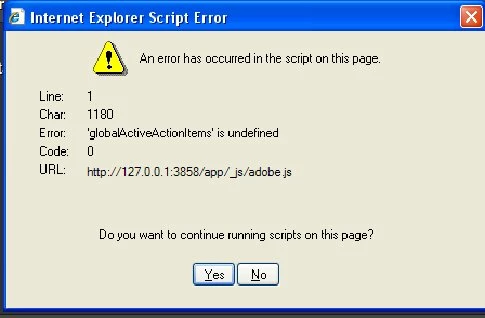
Using Windows XP Pro, Firefox 14.0.1 and IE 8.0.6001.18702  I downloaded the latest version of Flash Player for Windows.  The exe file was sucessfully saved but the installer failed to initialize.  The IE error message is below - a similar message was sent when trying Firefox re script error

Why is this occurring and is there a cure?
This topic has been closed for replies.
Correct answer Sunil_Bhaskaran

Could you please download Flash Player from the link provided in the following page, close browsers, and then double-click the downloaded file.

http://helpx.adobe.com/content/help/en/flash-player/kb/installation-problems-flash-player-windows.html#main-pars_header

Thanks,

Sunil

1 reply

Participant
August 20, 2012

This is the alternate error message from Firefox.  Note that it still says IE on the banner LHS

Sunil_Bhaskaran
Sunil_BhaskaranCorrect answer
Inspiring
August 21, 2012

Could you please download Flash Player from the link provided in the following page, close browsers, and then double-click the downloaded file.

http://helpx.adobe.com/content/help/en/flash-player/kb/installation-problems-flash-player-windows.html#main-pars_header

Thanks,

Sunil

chris.campbell
Legend
August 21, 2012

This scripting error should have been resolved earlier this week.  Next time you try and install, please try clearing your cache first.  If you run into the error again please let us know.