


Known Participant
December 12, 2015
Question

New High-End PC Build has weird horizontal "split" lines when Flash Player attempts fast-panning shots - HELP PLEASE!!!

  • December 12, 2015
  • 5 replies
  • 447 views

I have just built a new pc as my previous one, built 10 years ago, was running short of cpu and memory capacity.  Here's the specification:-

Case                Fractal Design Define R5 Silent Case

Power Supply    EVGA SuperNOVA GS 850 Watt Modular 80+ GOLD PSU

Motherboard      Gigabyte Z170X Gaming 7 Skylake LED ATX

CPU                Intel Core i7 6700K Unlocked Skylake Desktop

CPU Cooling    Noctua NH-U14S U-Series CPU Cooler

RAM                G.SKILL Ripjaws V Series F4-3200C16D-16GVR 16 GB (8 GBx2) DDR4 3200 MHz

Graphics Card  Palit NVIDIA GeForce GTX Titan

Drive C            Patriot BLAST 960GB 2.5" SATA SSD/Solid State Drive


I was hoping for great graphics and the pc performs faultlessly in that regard when playing games, when viewing DVDs or when watching videos on a VLC media player.  The problem occurs when watching a video played on the Flash Player such as on YouTube.  It is very evident when using Google Chrome and can just, but hardly, be seen when using Internet Explorer.  I have tried disabling the player via chrome://plugins/ and have relied on the downloaded and installed version 20.0.0.235 for my Windows 64-bit OS without any improvement.


I've uploaded a video to YouTube. At the beginning there appears to be screen interference but that is only evident on the camera so it is just a recording issue, not apparent in reality. The artefact appears in the second half of the video when it starts to pan (unfortunately it momentarily goes out of focus but refocuses in time to show the problem) which is especially obvious if you watch the tram.


I have also taken a screen grab of that and attached it as it is easier to see.
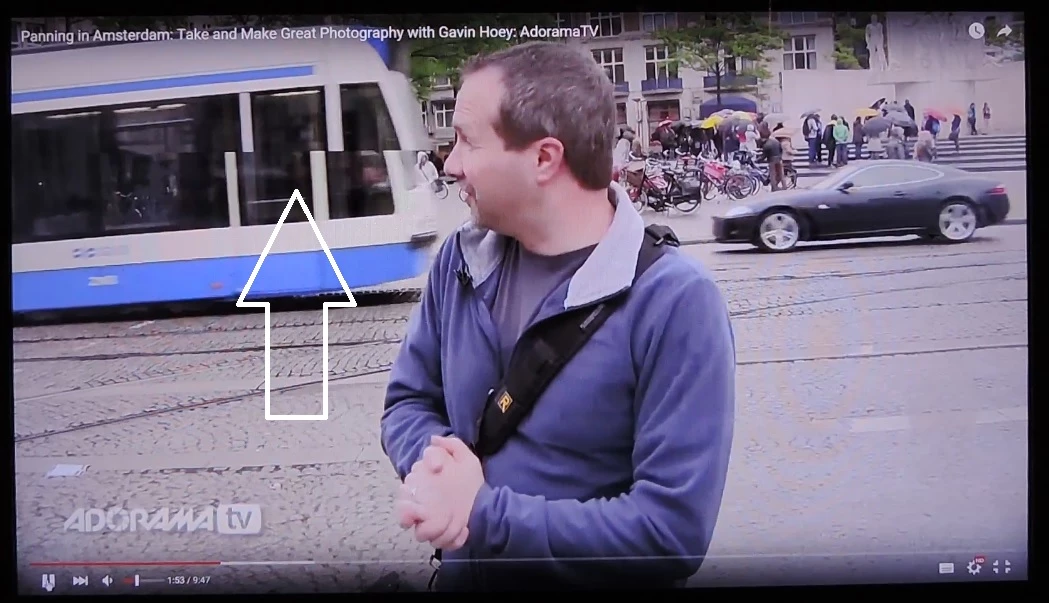

Can anyone suggest what steps I can take to resolve this issue.


Many thanks, in advance for your help!


This topic has been closed for replies.

5 replies

jeromiec83223024
Inspiring
December 14, 2015

Are you sure that the YouTube videos are Flash?  They're generally all HTML5 unless you're taking extraordinary measures to force them into Flash.  You can confirm by right-clicking on the movie.  If you see About Flash Player, it's us.  If you see about HTML5, it's HTML5.

If it actually is Flash, I'd start by disabling hardware acceleration to determine whether it's a video card driver issue or something else.  If the symptoms go away, you're looking for solution in the form of a driver update.

Details are covered in the video troubleshooting guide, here:

https://helpx.adobe.com/flash-player/kb/video-playback-issues.html

If you're still stuck, please follow the directions in the guide on providing the dxdiag report and additional information about what you tested and saw.

Snakes350Author
Known Participant
December 15, 2015

Thank you for your comprehensive reply.

You were right, the video is using the HTML5 not Flash Player.  My apologies.

I have tried forcing Google Chrome to use Flash Player but the artifact is still present.  The only partial solution I have found, which reduces the defect by 50% is to change the advanced settings (in Google Chrome) to disable hardware acceleration.  The same effect can be achieved in Internet Explorer by changing the settings to use software rendering acceleration rather than GPU acceleration.

I have made sure all the latest drivers are installed so I am unsure what to try next really but thank you for your help.

jeromiec83223024
Inspiring
December 15, 2015

If it's specific to a single video, it may be a problem with how the video is encoded.  If you're seeing it across all content, you might experiment with settings (particularly if there's a robust control panel for your graphics drivers) and/or with different mechanisms for connecting the graphics card to your monitor (DVI/HDMI/etc) until you figure out what change makes the symptoms disappear.