
itp13526685
Participant
October 27, 2016
Question

Offline Flash Player 23.0.0.205 MSI Failing for Multiple Clients

  • October 27, 2016
  • 3 replies
  • 9271 views

Noticing a trend with the latest offline installer, multiple client affected.  Trying to update from 22.0.0.192 for both the Active X and the NPAPI Plug-in.

It uninstalls 22 and leaves the workstation with no Flash.  Fails with this error code:

Product: Adobe Flash Player 23 ActiveX -- Error 1714.The older version of Adobe Flash Player 23 ActiveX cannot be removed.  Contact your technical support group.  System Error 1612.

Product: Adobe Flash Player 23 NPAPI -- Error 1714.The older version of Adobe Flash Player 23 NPAPI cannot be removed.  Contact your technical support group.  System Error 1612.

When trying to manually run the install it says:
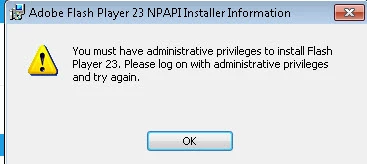
Was able to manually run the installer from the website and it looks to have fixed the Active X plug in.  However, we need to push this to a large number of clients.  The "Flash uninstaller" doesn't appear to fix the issue.

Anyone else seeing this?

This topic has been closed for replies.

3 replies

Participant
November 4, 2016

Hi guys,

I have a blog post on that issue (error 1612). I had the same issue installing Flash player (previous versions too). It was hit and miss and I banged my head for 2-3 days. I finally figured out the root cause of that problem. It wasn't the problem with admin rights of the user. I had situation when I had to deploy it to over 5,000 workstations automatically (using SCCM). Every time you run install interactively (either .exe or extracted .msi) it works fine, but when you deploy it with SCCM (KEY - it is using system account to do installations) it fails in many cases. The root cause of it is the "C:\ProgramData\Oracle\Java" is not getting created when it runs as SYSTEM account. I wrote the script that creates that directory and pre-populates it with .cfg file. (as well as it uninstalls all old versions of Flash player before starting installation...). You can read full blog post here:

http://www.itninja.com/blog/view/deploying-adobe-flash-player-currently-23-0-0-205-with-sccm2012-current-branch-previously-removing-all-old-versions

_maria_
Legend
November 4, 2016

Hiebogopolskiy

Flash Player and Java are 2 distinct products and the Flash Player installer has no interaction with Java during installation, including creating an C:\ProgramData\Oracle\Java directory.

Error 1612 indicates the MSI installer is unable to locate the previous MSI installer/metadata.

What .cfg file are you referring to?

If you provide a MSI log file with verbose and extra debugging options selected (/L v*x) as well as the FlashInstall.log file for the same installation attempt we can investigate further.  A verbose MSI log file with extra debugging options enabled are quite long.  Please upload the files to cloud.acrobat.com/send (see How to share a document​) and post the link to the uploaded files in your reply.

--

Maria

_maria_
Legend
October 27, 2016

Hi,

I'll need to get the entire FlashInstall.log file from you, not just the excerpt provided, as well as a verbose MSI install log file with extra debugging option enabled (Logging options v and x).  The files, especially the verbose MSI log file, will be very large. Please upload the files to cloud.acrobat.com/send using the instructions at How to share a document and post the link to the uploaded files in your reply.

Also provide the following information:

  • OS, including version of the impacted systems.
  • Is the behaviour only observed when upgrading from 22.0.0.192 to 23.0.0.205, or does it affect other upgrade paths?
  • How exactly are you deploying the update
  • Flash Player installation does require Admin permissions to install.  The 2nd screenshot you post appears to be from an account that does not have Admin permissions.  Please confirm if the user running the installer is an Admin user or some other user account.

Thank you

--

Maria

November 1, 2016

Hi m_vargas, please help me with the link to flash player 23.0.0.205 for windows 7 64 bits, for microsoft explorer and google chrome. thanks

_maria_
Legend
November 1, 2016

Hi,

Please private message me the name and email address you used to apply for a distribution license.  Note that public email addresses (e.g. yahoo, hotmail, gmail) are not allowed.  If you used a public email address to apply for the distribution license the request would have been denied and you'll need to re-apply with a business/organization/non-public email address.

To send a private message, mouse-over my User ID link and click the 'message' link button.

--

Maria

itp13526685
Participant
October 27, 2016

Here is the FlashInstall.log from the C:\Windows\System32\Macromed\Flash location:

=O====== M/22.0.0.192 2016-10-27+15-56-34.253 ========

0000 00000010 "C:\WINDOWS\TEMP\{FDEFAE8D-5CB4-4D10-A8BC-5C62BDC7E186}\InstallFlashPlayer.exe" -uninstall plugin

0001 00001037 SOFTWARE\Microsoft\Windows\CurrentVersion\Uninstall\Adobe Flash Player NPAPI/ 2

0002 00001037 SOFTWARE\Microsoft\Windows\CurrentVersion\Uninstall\Adobe Flash Player Plugin/ 2

0003 00001037 Software\Microsoft\Windows\CurrentVersion\RunOnce/FlashPlayerUpdate 2

0004 00001037 Software\Macromedia\FlashPlayerPlugin/ 2

0005 00001037 Software\Macromedia\FlashPlayer/FlashPlayerVersion 2

0006 00001037 Software\Macromedia\FlashPlayer/SwfInstall 2

0007 00001037 SOFTWARE\Microsoft\Windows\CurrentVersion\Uninstall\Adobe Flash Player Plugin/ 2

0008 00001021

0009 00001036 Software\Macromedia\FlashPlayerActiveX/PlayerPath 2

0010 00001036 Software\Macromedia\FlashPlayerPlugin/PlayerPath 2

0011 00001036 Software\Macromedia\FlashPlayerPepper/PlayerPath 2

0012 00001036 Software\Macromedia\FlashPlayerActiveX/PlayerPath 2

0013 00001036 Software\Macromedia\FlashPlayerPlugin/PlayerPath 2

0014 00001036 Software\Macromedia\FlashPlayerPepper/PlayerPath 2

0015 00001037 SOFTWARE\Microsoft\Windows NT\CurrentVersion\Image File Execution Options\\FlashPlayerApp.exe/ 2

0016 00001037 Software\Microsoft\Windows\CurrentVersion\Control Panel\Extended Properties\System.ControlPanel.Category/C:\WINDOWS\system32\FlashPlayerCPLApp.cpl 2

0017 00001036 Software\Macromedia\FlashPlayerActiveX/PlayerPath 2

0018 00001036 Software\Macromedia\FlashPlayerPlugin/PlayerPath 2

0019 00001036 Software\Macromedia\FlashPlayerActiveX/PlayerPath 2

0020 00001036 Software\Macromedia\FlashPlayerPlugin/PlayerPath 2

0021 00001036 Software\Macromedia\FlashPlayerPepper/PlayerPath 2

0022 00001036 Software\Opera Software/Last CommandLine 2

0023 00001036 Software\Opera Software/Last CommandLine 2

0024 00001036 Software\Opera Software/Plugin Path 2

0025 00001036 Software\Opera Software/Plugin Path 2

=X====== M/22.0.0.192 2016-10-27+15-56-34.295 ========