


augustjames
Participant
September 8, 2016
Answered

OSX: Flash Player Installer pops up easily 10x a day

  • September 8, 2016
  • 2 replies
  • 598 views

Dear Adobe Team,

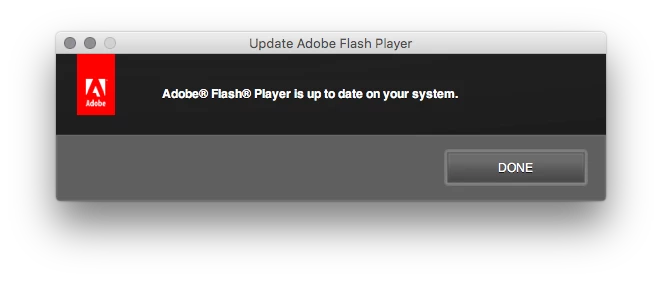
On my Macbook Pro with OSX 10.11.6 the flash player installer app launches easily 10 times a day, without me asking for it.

What happens is I do my work and randomly get a pop up telling me that Flash player is up to date on my system.

10. times. a. day.

Unfocuses whatever app i'm wokring in too so I often loose text entry due to it.

I do not know what is prompting it to open, I have the following programs open all day: Firefox 48.0.1, Apple Mail, Mailplane 3, Slack, Apple Notes.

I cannot spend a day with these apps closed for troubleshooting, this is my work machine.

Do you have any suggestions what to do? How can I update the Flash Player Installer or why is that app even on my system?

Thank you for your assistance!
This topic has been closed for replies.
Correct answer _maria_

Thanks for the info. 

The reason the pop-up is happening is because the PPAPI plugin (used by Opera and Chromium-based browser, except Chrome) is an older version of Flash Player.  The update checker runs and attempts to check for an update, but the check is failing due to an 'unable to connect to server' error.  Since it can't connect to the server, it then returns the message you are seeing.  We've not seen the error returned in your log file and need to investigate further. 

Do you use a proxy server?

Does your system have restrictions on what processes can access the internet?

If you do use the PPAPI plugin, launch the Chromium-based browser that uses it and go to https://get.adobe.com/flashplayer to download and install the latest version of the PPAPI plugin.

If you don't have/use a Chromium-based browser I recommend uninstalling it.  Unfortunately, the Mac uninstaller currently doesn't support removing only one player type (e.g. PPAPI only, or NPAPI only).  It will uninstall all Flash Player plugins present on the system and you'll then need to re-install the NPAPI plugin (used by Firefox).  To uninstall use either the standalone uninstaller​ or the Adobe Flash Player Install Manager.app located at /Applications/Utilities.  After the player is uninstalled, launch Firefox and go to https://get.adobe.com/flashplayer to download and install the NPAPI plugin.

2 replies

augustjames
Participant
September 9, 2016

Hi! Intersting!

I use Little Snitch and for some reason Flash Player Installer was blacklisted.

I downloaded and installed the PPAPI update – let's see what happens.

I think this confusion could be avoided for other users if the Install Manager

threw a warning about the missing Internet connection – as I would've obviosuly

figured out the problem if it told me

Thank you for your assistance, I expect it to be fine now

Have a good weekend!

_maria_
Legend
September 9, 2016

Thank you for the info on using Little Snitch.  We're scheduled to release an update next week.  Since you're update setting is configured to 'notify me of updates' it may take a few days for the update check to happen.  If the issue is resolved, the update notification will display indicating an update is available (since you have both NPAPI & PPAPI this will happen twice, once for each plugin type).  If the issue persists, it'll behave the same as you originally reported.  If you experience the same behaviour please post back to this topic so we can investigate further.

_maria_
Legend
September 8, 2016

Hi,

Please do the following:

  • Go to System Preferences > Flash Player > Updates tab
  • Post a screenshot of the Updates tab
  • Go to ~/Library/Logs/ and obtain the FlashPlayerInstallManager.log file
  • Go to /Library/Application Support/Adobe/Flash Player Install Manager and obtain the FPSAUConfig.xml file
  • Upload both files (FlashPlayerInstallManager.log and FPSAUConfig.xml) to cloud.acrobat.com/send using the instructions at How to share a document and post the link to the uploaded file in your reply

--

Maria

augustjames
Participant
September 8, 2016

Hi Maria!

Thanks for getting back to me!

Here are the files you requested:

Dateien freigegeben - Acrobat.com

Cheers

_maria_
_maria_Correct answer
Legend
September 9, 2016

Thanks for the info. 

The reason the pop-up is happening is because the PPAPI plugin (used by Opera and Chromium-based browser, except Chrome) is an older version of Flash Player.  The update checker runs and attempts to check for an update, but the check is failing due to an 'unable to connect to server' error.  Since it can't connect to the server, it then returns the message you are seeing.  We've not seen the error returned in your log file and need to investigate further. 

Do you use a proxy server?

Does your system have restrictions on what processes can access the internet?

If you do use the PPAPI plugin, launch the Chromium-based browser that uses it and go to https://get.adobe.com/flashplayer to download and install the latest version of the PPAPI plugin.

If you don't have/use a Chromium-based browser I recommend uninstalling it.  Unfortunately, the Mac uninstaller currently doesn't support removing only one player type (e.g. PPAPI only, or NPAPI only).  It will uninstall all Flash Player plugins present on the system and you'll then need to re-install the NPAPI plugin (used by Firefox).  To uninstall use either the standalone uninstaller​ or the Adobe Flash Player Install Manager.app located at /Applications/Utilities.  After the player is uninstalled, launch Firefox and go to https://get.adobe.com/flashplayer to download and install the NPAPI plugin.