Participant
February 7, 2021
Answered

Password or username not accepted

  • February 7, 2021
  • 2 replies
  • 254 views

I am trying to follow the directions and remove Adobe Flash Player from my Mac.

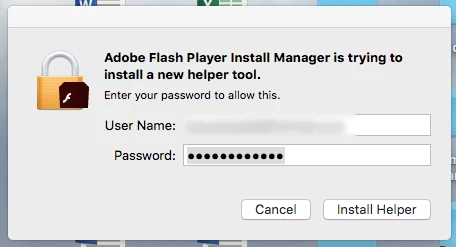
I keep getting the below box but when I enter my username and password that Adobe uses to sign me in, the box just vibrates.

Any ideas?


[Attachment removed by moderator.]

 

This topic has been closed for replies.
Correct answer Nancy OShea

Please DO NOT post sensitive information in this public user-to-user community.  For your protection, your attached file was removed.


The redacted screenshot above, shows that your operating system is asking if you want to install the Adobe helper application.  Assuming you have administrative level permissions to install software, enter your computer user name and password.  Otherwise, contact your organization's IT dept for assistance.


2 replies

Nancy OShea
Community Expert
Nancy OSheaCommunity ExpertCorrect answer
Community Expert
February 7, 2021

Please DO NOT post sensitive information in this public user-to-user community.  For your protection, your attached file was removed.


The redacted screenshot above, shows that your operating system is asking if you want to install the Adobe helper application.  Assuming you have administrative level permissions to install software, enter your computer user name and password.  Otherwise, contact your organization's IT dept for assistance.


Nancy O'Shea— Product User & Community Expert
Legend
February 7, 2021

You need to recognise the different kinds of password prompt, to keep safe. This is asking for your Mac password, because it needs to change your Mac. You get it whenever you install apps, and often when you uninstall, and at other times. Be sure you trust the app you are running.