Inspiring
September 18, 2016
Answered

Please help me configure Adobe Flash Player updates

  • September 18, 2016
  • 3 replies
  • 534 views

Dear Forum members,

I want to manage my settings so that when an update is available I can install. Without thinking I ticked a box that said install updates automatically. Then I realised that if I do that it will also install McAfee security which I don't need.

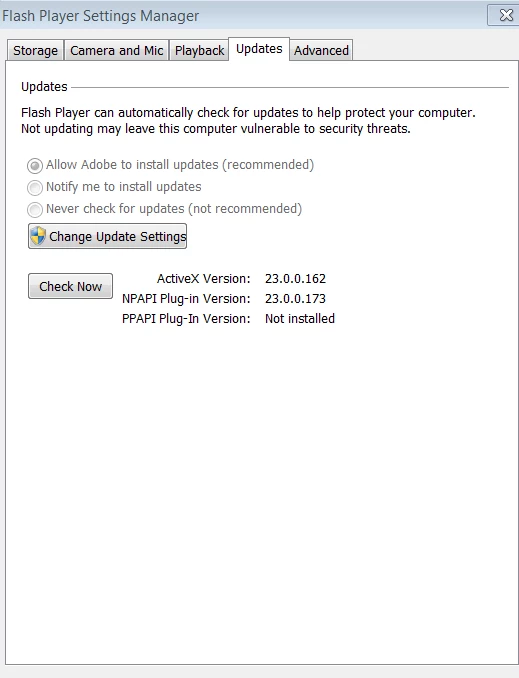
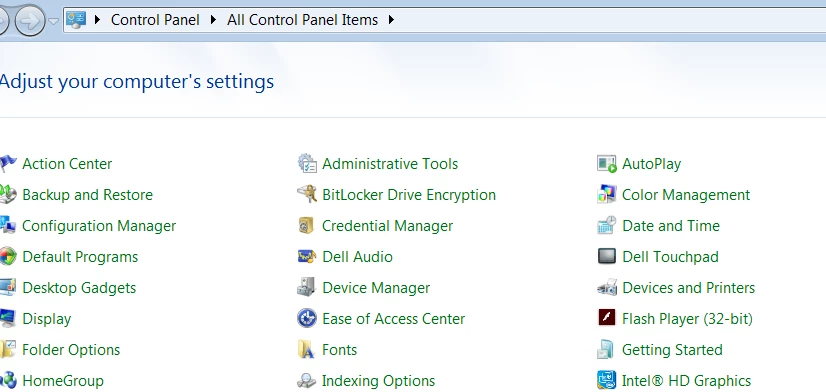
I have searched online how to get the box with the three options and it says go to control and get all my programs listed but that doesn't bring up the flash player settings manager with the three options on the advanced tab.

I have tried and tried to get this box on screen but can't manage to do it.

This computer man is old and not really very computer savvy.

Can someone please help me?

Thank you.

Anthony
This topic has been closed for replies.
Correct answer Kratika Agarwal

Hi,

Go to Control panel and choose Flash player and choose tab "updates".

3 replies

_maria_
Legend
September 19, 2016

"Without thinking I ticked a box that said install updates automatically. Then I realised that if I do that it will also install McAfee security which I don't need."

The 'Allow Adobe to install updates automatically (recommended)' option opts your system into Background Updates and Background Updates do NOT install any third party offers.  Third party offers are only offered when downloading from the adobe.com site.

Inspiring
September 19, 2016

Dear Kratika Agarwal,

Thank you so much for your help. It solved my problem!

Thanks

Anthony

Kratika AgarwalCorrect answer
Participating Frequently
September 19, 2016

Hi,

Go to Control panel and choose Flash player and choose tab "updates".