Participant
December 15, 2013
Answered

**PLEASE HELP - Unable to complete installation of new flash player...

  • December 15, 2013
  • 1 reply
  • 607 views

I updated my operating system to Mac OS X Mavericks and went to youtube and it told me that my flash player was out of date (SAFARI).  I followed the link to download the new version of flash player which seems to be 11.9 and the process works fine.  I reach this box...
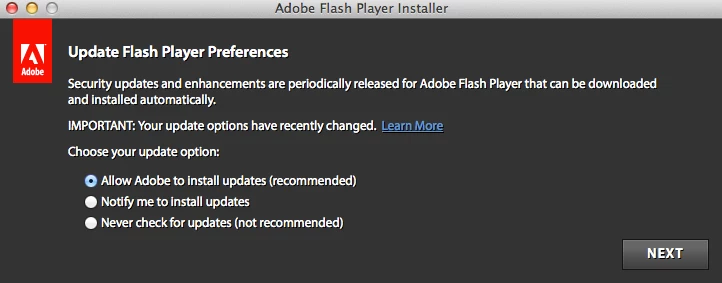
and I am completely unable to click on anything.  When I drag my mouse over any of the three options, they highlight, as well as the NEXT button, but they won't let me click.  The only way to get out of the window then is for me to press Alt+Cmd+Esc to force quit the Adobe Flash Player Installer.  Please help me figure out what is going on?

Also, some pages (seems like most) on Adobe's website won't let me click on anything either, I have to right click on links and open them in new tabs to navigate their website.

Thank you in advance!

This topic has been closed for replies.
Correct answer C_F_McBlob

Download the offline installer: Flash Player (Mac OS X)

Quit everything but Finder.

Double click the DMG and let it mount & open.

RIght click the installer and choose "Show Package Contents".

In the Contents/Resources folder, double click the Adobe Flash Player.pkg file and let it run.

1 reply

C_F_McBlob
C_F_McBlobCorrect answer
Inspiring
December 15, 2013

Download the offline installer: Flash Player (Mac OS X)

Quit everything but Finder.

Double click the DMG and let it mount & open.

RIght click the installer and choose "Show Package Contents".

In the Contents/Resources folder, double click the Adobe Flash Player.pkg file and let it run.

Participant
December 16, 2013

Mike,

Thank you so much for your feedback, it worked and the issue is completely resolved! it's greatly appreciated especially since apple offered to diagnose my computer for a small fee of $150.

Thanks again!!