Participating Frequently
February 5, 2016
Answered

Plug In Failure - Exclamation Mark

  • February 5, 2016
  • 1 reply
  • 1723 views

I keep getting "plug in failure" and a big exclamation mark when watching videos online.

I have tried un-installing and installing flash player several times but it doesn't seem to do anything.


I have a mac OS X Yosemite - version 10.10.5

Safari version 9.0.3

Under the flash system preferences it says " NPAPI plug in version 20.0.0.286 in installed" if that makes a difference.

I do not know much about computers and would really appreciate help

Thank you

This topic has been closed for replies.
Correct answer jeromiec83223024

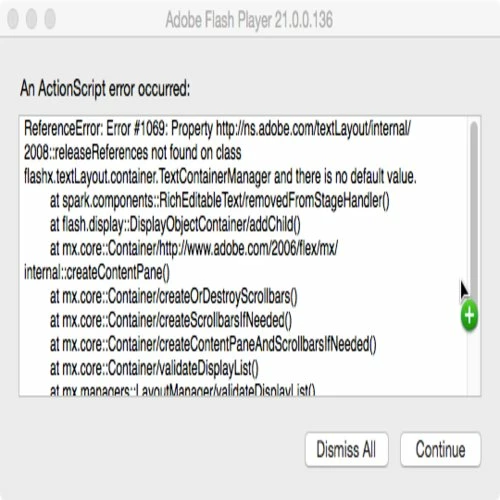
This keeps popping up:


Are you using the debugger version of Flash Player?  You can check by right-clicking on the content.  If you see "Show Redraw Regions" in the list, you're using the debugger.

If that's the case, you should switch back to the release player.  Not sure if it will make the OOM problem go away, but it will perform much better, and you won't see all the error message that the ActionScript content is throwing.

You'll have to uninstall, then reinstall the release build.

Uninstall Flash Player - Mac:

https://helpx.adobe.com/flash-player/kb/uninstall-flash-player-mac-os.html

Download the installer from here:

http://get.adobe.com/flashplayer

1 reply

Participating Frequently
February 6, 2016

Hi,

Please go to below page and click on check now button:

Adobe - Flash Player

Please share the Flash player version you are using.

Also mention any particular Flash URL for which this issue occurs with steps to reproduce the issue so that we can look into it.

Thanks

Participating Frequently
February 6, 2016

It says I have 20.0.0.286 installed which according the the cart iis the appropriate version for mac OS X and safari.

It seems to happen on all sites that use flash player (especially videos) not just one particular site .

It seems to be occurring more often the last few days.

Participating Frequently
February 6, 2016

Please log a bug in our bugbase https://bugbase.adobe.com/

and share steps to reproduce the issue.

Please share the bug number.

Thanks