
Participant
August 20, 2020
Question

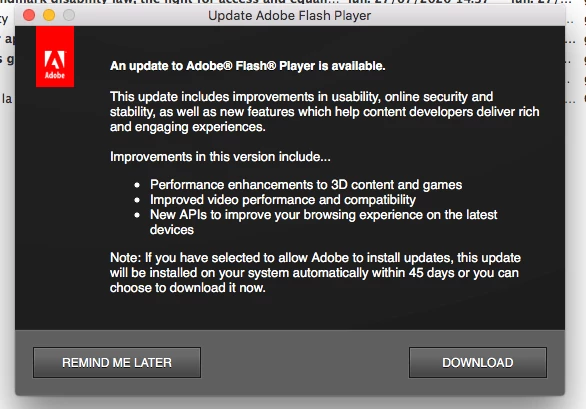
Pop up window from Flash Player

  • August 20, 2020
  • 1 reply
  • 456 views

Hi, as I am working on the computer I get an Adobe flash player window saying I must update it. I went instead to Adobe's site and did it from there. The problem is I cannot get rid of this pop up window encouraging me to do it. Very anoying while you are working. It seems to be something which does not come from Adobe, but how do I get rid of it? Thank you very much. I have an iMac 10.11.6 and a Flash Player v
    This topic has been closed for replies.

    1 reply

    _maria_
    Community Manager
    Community Manager
    August 20, 2020

    There are different plugins of Flash Player for different browsers.  The notification is for one of those. The Flash Player download page (https://get.adobe.com/flashplayer) auto-detects the OS and browser and offers the Flash Player plugin for that combination.  If you keep getting the update notification, you most likely have a plugin for a different browser that needs to be updated.

    To see which plugin is out-dated, go to System Prefererences > Flash Player > Updates tab.  This will tell you which Flash Player plugins are installed for which browsers and the version for each.  The latest version is 32.0.0.414.  If one of these is an older version, click Check Now to update the out-dated version.


    <Edit>


    To ensure that all Flash Player plugins, for the various browsrs, are updated, it's recomended that users opt into Background Updates.  With Background Updates, Flash Player pings Adobe servers once per day to see if there's an update.  If there it it'll update all Flash Player plugins installed within 24 hrs of a new version being released.  With notification updates (what you have now), it can take up to 7 days to check for an update, and it only updates the Flash Player plugin that notifies you an update is available for, leaving the other ones not updated.  As such, Adobe recommends users opt into Background Updates as it's more secure that Notification Updates.  You can modify the Update settings in System Preferences > Flash Player > Updates tab.

    GDG7Author
    Participant
    August 26, 2020


    Hi, as soon as I sent you the email below, today again I had that popup window. Now really I don’t know what to do. It hadn’t appeared for days and days. Thank you.


    Hi, thank you so much for your advise. I’ve waited a few days after I followed your suggestion of a possible missing plug-in to make sure it that popup window didn’t come up again. After four days that I found and added one that was to be downloaded, the popup window has not come up. I thank you very very much because it was impossible to work with it coming up all the time. Your very appreciative buddy,
    DGD7

    _maria_
    Community Manager
    Community Manager
    August 26, 2020

    Please post a screenshot of the System Prefererences > Flash Player > Updates tab.