


Participant
January 11, 2019
Question

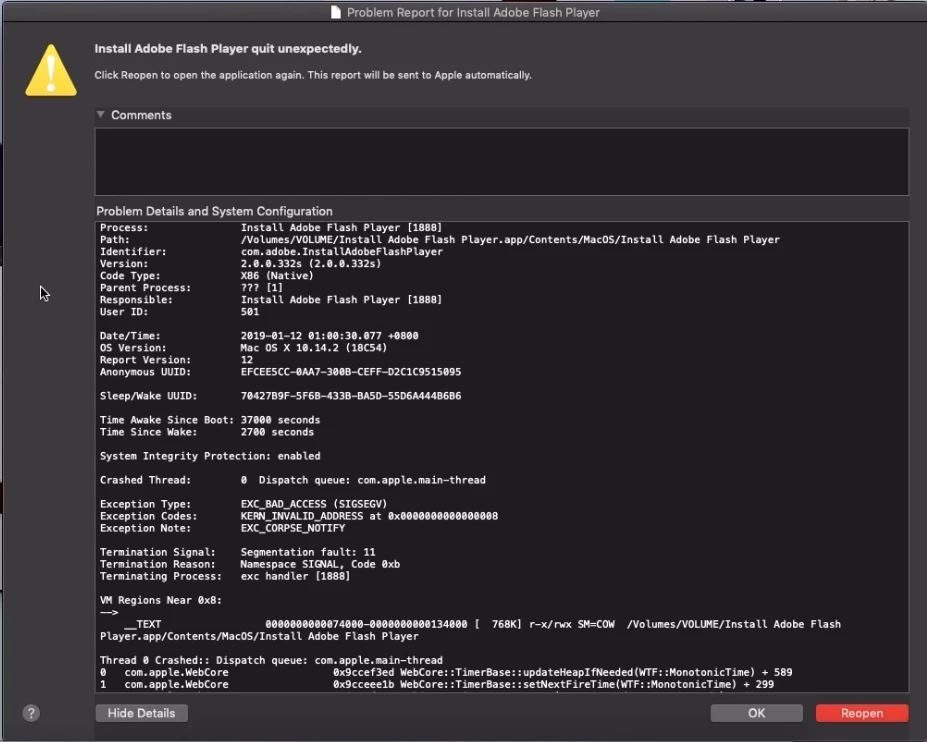
PPAPI online installer crashing on macOS 10.14.2

  • January 11, 2019
  • 1 reply
  • 309 views

I'm trying to install flash on my Mac 10.14.2 Chromium browser and every time I get a pop up screen after the installation that says Install Adobe Flash Player quit unexpectedly. Installing on Safari is fine but Chromium is a NoGo?
This topic has been closed for replies.

1 reply

_maria_
Community Manager
Community Manager
January 11, 2019

Comment branched to a new discussion topic as it doesn't relate to the topic originally posted to.

Installing on Safari is fine but Chromium is a NoGo?

This is odd, as the online installer is the same for both NPAPI & PPAPI installers.  Essentially the online installer is a shim installer that downloads and installs Flash Player silently in the background.  The online installer is the same in both cases, and only the payload (the actual Flash Player installer) is different.

We'll need the entire contents of the crash log to investigate further.  Please copy and paste the entire contents of the crash log into a new text file and upload it to cloud.acrobat.com/send (see How to share a file using Adobe Document Cloud​) or some other file sharing service of your choice that doesn't require user account to access.  Post the link to the uploaded file in your reply.  I'll forward the crash log file to the appropriate team for further investigation.

In the interim, try the offline installer posted at the bottom of the Installation problems | Flash Player | Mac page in the 'Still having problems section'.

Are you downloading the file using the Chromium browser?  What version of the Chromium browser are you using?

Also provide the system information from Apple menu > About this mac (Serial number is not necessary)

Please do provide the crash log file so that we can investigate further.

Thank you.

--

Maria