


January 27, 2021
Answered

Problem deleting all remnants of Adobe Flash FP Video from LaunchPad!!??

  • January 27, 2021
  • 1 reply
  • 198 views

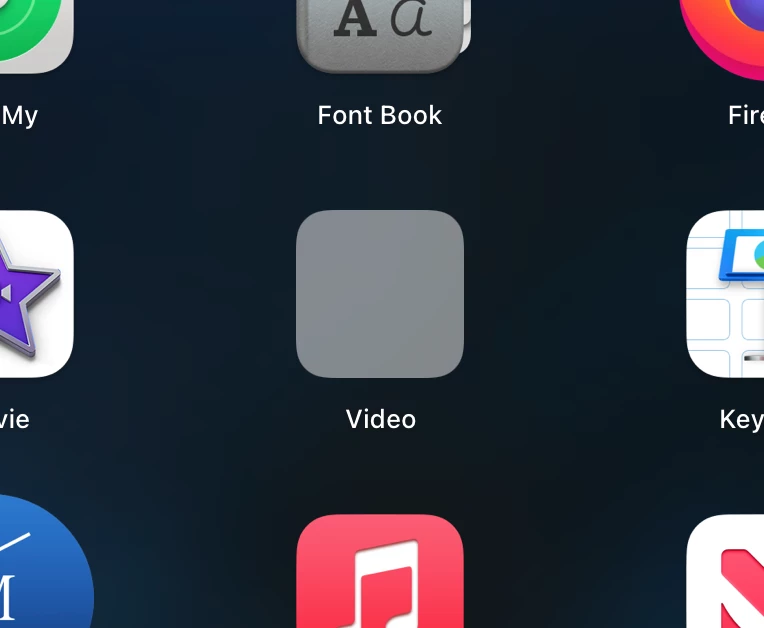
I purchased  a iMac SSD desktop December 2020 and discovered it had Adobe Flash FPVideo software installed when I clicked on FPVideo switch on the LaunchPad and got a warning that it was a dangerous application and should be deleted.  The Adobe Uninstaller didn't quite get it all out nor did trying to delete the applications from the files.  Near as I can tell, it's all been deleted except a Non-functional gray switch labeled "Video" on the LaunchPad.  Apple was NO HELP!  Re-installing OS Big Sur 11.1 did nothing to get rid of the usless gray switch.  Help?  If anyone has an idea to rid the LaunchPad of the "Video" switch, I would greatly appreciate it!  Sincerely,  T Cobble
    This topic has been closed for replies.
    Correct answer Test Screen Name

    FPVideo is nothing to do with Flash at all. Nor Adobe. It is malware, which arrives on your computer by disguising itself as a Flash update, which tricked you (or a previous owner). So, no Adobe uninstaller is going to touch it. You need a good malware cleaner (but DON'T search with Google, most "malware cleaners" are actually more malware!)

    1 reply

    Test Screen NameCorrect answer
    Legend
    January 27, 2021

    FPVideo is nothing to do with Flash at all. Nor Adobe. It is malware, which arrives on your computer by disguising itself as a Flash update, which tricked you (or a previous owner). So, no Adobe uninstaller is going to touch it. You need a good malware cleaner (but DON'T search with Google, most "malware cleaners" are actually more malware!)