


Participating Frequently
August 2, 2016
Question

Problem with Flash Player on Safari and MacOS 10.10.5

  • August 2, 2016
  • 1 reply
  • 1318 views

Jerome -- This is more than annoying to me ... it repeatedly stops my computer dead! I have updated Flash Player to the current version. I am running Mac OS 10.10.5 and can't go any higher due to incompatibility with other Adobe software. This started happening quite a while after I had been running Yosemite successfully with Safari. I have to suspect a Flash Player update caused this problem. Can you please tell me a version of your Player that is compatible with this version of Safari? Here are the instances of Flash Player in my system. Perhaps this came with Adobe Animate?
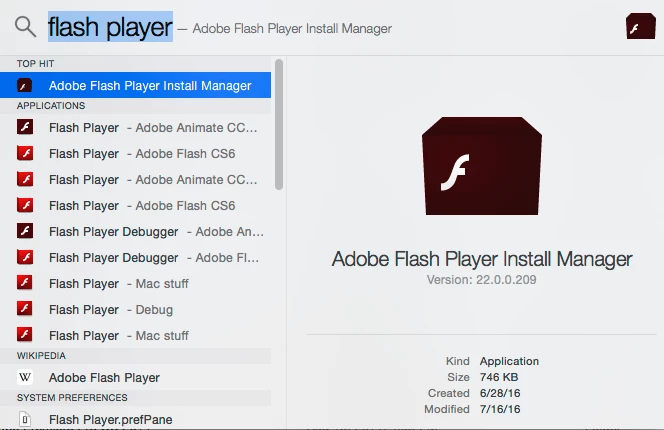
Thanks, Beth

    This topic has been closed for replies.

    1 reply

    jeromiec83223024
    Inspiring
    August 2, 2016

    It sounds like the symptoms you're experiencing are distinct from the thread that you replied to, so I've branched the thread out to offer you more personalized advice.

    I'm unclear on what you mean about "stops your computer dead".  If you're simply receiving a dismissible error dialog, that's different than locking up the computer.  A clear explanation of the symptoms would help me to offer you useful advice.

    If you installed Animate, there's a very good chance that you're now running the Flash Player Debugger, which is intended for content developers building Flash content.  In the release player, pop-up errors are normally suppressed, but the debugger shows them (for debugging purposes).  If this is the case, as you've probably noticed, there's a lot of content throwing errors in the world.

    You can revert to the release player by uninstalling Flash Player and re-installing the standard release verion:

    Uninstall Flash Player - Mac:

    https://helpx.adobe.com/flash-player/kb/uninstall-flash-player-mac-os.html

    Download Flash Player:

    http://get.adobe.com/flashplayer/

    gnusartAuthor
    Participating Frequently
    August 2, 2016

    Hi -- By stops dead, I mean complete crash, needs reboot. Is this the "standard release version?"

    jeromiec83223024
    Inspiring
    August 2, 2016

    Yeah, that's very different than the original post.  It's unlikely that the debugger (or the release player for that matter) would force your machine to reboot.  What is far more likely, is that there's a driver bug (most likely the GPU) that's fixed in a subsequent MacOS update.  The OS abstracts away hardware so that we *can't* take the machine down.  We're tickling something underneath us that's actually causing the crash.

    If you go directly to the link I posted above, using the browser you want to use, we'll automatically deliver you the correct payload.  That said, it looks like the right choice.

    Getting to a known good baseline with Flash Player is a good place to start, but I'm not super optimistic.  I think what's more likely going to be a solution is to disable Hardware Acceleration in Flash.

    It seems very surprising that our tooling (unless maybe you're stuck on an old version) requires you to stay on Mac 10.10.5.  Out of curiosity, what's the limitation there?  If that's a real limitation in one of our currently shipping products, I'd like to escalate that to the right product team and at least understand what's going on there.

    Thanks!