Participant
May 25, 2018
Answered

Problem with internal server update

  • May 25, 2018
  • 1 reply
  • 397 views

Hello,

I follow the flash_player_29_0_admin_guide.pdf pages 28/29,

The web server is a linux centos 7 VM,

The certificate is installed and works.

There is the tree :
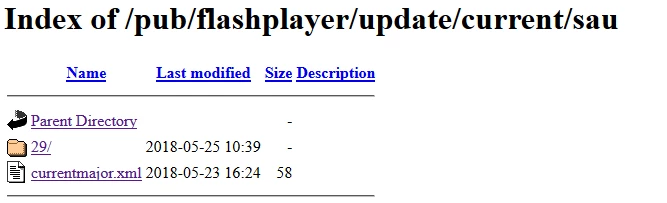
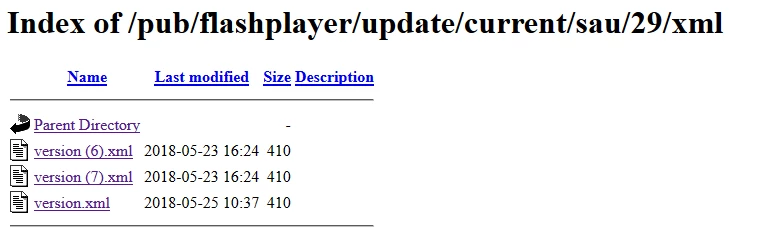
All the files are from the fp_background_update.cab

There is the logfile :

2018-5-25+8-40-19.186 [info] 1628 server.crous-amiens.fr

2018-5-25+8-40-19.190 [info] 1629 server.crous-amiens.fr

2018-5-25+8-40-19.194 [info] 1614

2018-5-25+8-40-19.198 [info] 1615

2018-5-25+8-40-19.202 [info] 1618

2018-5-25+8-40-19.206 [info] 1619 1063

2018-5-25+8-40-19.222 [info] 1628 server.crous-amiens.fr

2018-5-25+8-40-19.226 [info] 1629 server.crous-amiens.fr

2018-5-25+8-40-19.230 [info] 1614

2018-5-25+8-40-19.233 [info] 1615

2018-5-25+8-40-19.237 [info] 1618

2018-5-25+8-40-19.242 [info] 1604

2018-5-25+8-40-19.242 [info] 1608

2018-5-25+8-40-19.248 [info] 1631 /pub/flashplayer/update/current/sau/currentmajor.xml

2018-5-25+8-40-19.297 [info] 1630 /pub/flashplayer/update/current/sau/29/xml/version.xml

2018-5-25+8-40-19.303 [info] 1632

2018-5-25+8-40-19.307 [info] 1632

2018-5-25+8-40-19.312 [info] 1630 /pub/flashplayer/update/current/sau/29/xml/patch.xml

2018-5-25+8-40-19.317 [warning] 1445

2018-5-25+8-40-19.321 [info] 1632

2018-5-25+8-40-19.325 [info] 1601

2018-5-25+8-40-19.461 [error] 1217 -2146881269

2018-5-25+8-40-19.465 [error] 1300 183

2018-5-25+8-40-19.469 [info] 1612

2018-5-25+8-40-19.473 [info] 1620

What is the patch.xml file ? This is not provided and the error seems related to it.

Regards,

This topic has been closed for replies.
Correct answer _maria_

Hi kennyd55693258

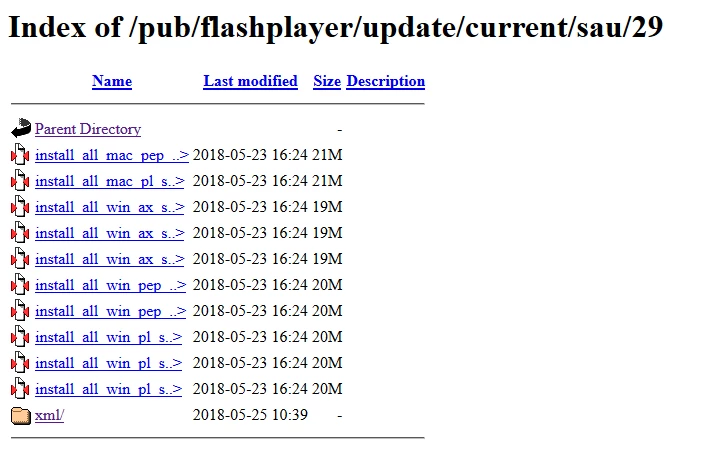
Based on your screenshot, it doesn't appear you're implementing the correct directory structure as the install files are not in an 'install' directory, as per the instructions in the Admin Guide (page 28 of the latest version).  Are you using the licensed distribution package of the Background Update files?  The licensed Background Update package extracts the files into the correct directory structure.  If you're not using the licensed distribution package, please apply for a license (if you haven't done so) and use that instead of attempting to build your own directory structure. 

It looks like you have way too many files in the directory.  Since the file names are truncated, I can't tell what the file names are.  Can you get a view of the files where they are not truncated and post a screenshot of that?

Finally, the Mac files are in the wrong directory.  If you're using Mac, they need to be in an 11/install directory, not latest major version number directory.  This is also demonstrated in the sample output on page 28 & 29 of the (latest version) Admin Guide.

Again, the best thing to do is to use the licensed Background Update package as it takes care of putting the files in the correct directory structure.

--

Maria

1 reply

_maria_
_maria_Correct answer
Legend
May 25, 2018

Hi kennyd55693258

Based on your screenshot, it doesn't appear you're implementing the correct directory structure as the install files are not in an 'install' directory, as per the instructions in the Admin Guide (page 28 of the latest version).  Are you using the licensed distribution package of the Background Update files?  The licensed Background Update package extracts the files into the correct directory structure.  If you're not using the licensed distribution package, please apply for a license (if you haven't done so) and use that instead of attempting to build your own directory structure. 

It looks like you have way too many files in the directory.  Since the file names are truncated, I can't tell what the file names are.  Can you get a view of the files where they are not truncated and post a screenshot of that?

Finally, the Mac files are in the wrong directory.  If you're using Mac, they need to be in an 11/install directory, not latest major version number directory.  This is also demonstrated in the sample output on page 28 & 29 of the (latest version) Admin Guide.

Again, the best thing to do is to use the licensed Background Update package as it takes care of putting the files in the correct directory structure.

--

Maria

Participant
May 28, 2018

Hello Maria,

You were good it's because I forgot to create the install folder, it works now,

I have done the licensed distribution, and dowloaded the .cab file, there was no folder in it.

Thanks a lot,

Regards,

_maria_
Legend
May 29, 2018
dowloaded the .cab file, there was no folder in it.

How did you extract the contents of the .cab file?  It seems using Windows File Explorer doesn't preserve the directory structure, but using something like WinZip or 7Zip does:

I'll follow-up with the appropriate folks and see if the directory structure can be preserved when using File Explorer.