


Problems removing adobe flash player from system with windows 7
Hallo,
Ik kreeg een bericht om Adobe Flash Player te verwijderen van mijn computer omdat het niet langer ondersteund wordt.
Via de link in het bericht heb ik dit gedaan.
Maar wanneer mijn computer nu in slaaptoestand gaat, krijg ik een leeg scherm. Bij indrukken van de enter-toets krijg ik dan volgende melding :
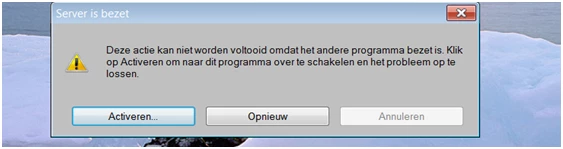
Kies ik voor 'Activeren' dan gebeurt er niets; kies ik voor 'Opnieuw' gebeurt er ook niets. En 'annuleren' kan ik niet kiezen.
PS Mijn computer werkt met Windows 7 Home Premium.
Hoe los ik dit probleem op ?
Vermoedelijk is Adobe Flash Player niet helemaal verwijderd, maar ik zie het programma niet meer onder 'Programma's' op mijn computer.
Gelieve mij een oplossing te sturen voor dit probleem.
Vriendelijke groeten,
Theo Steenhuyzen
Hello,
I got a message to remove Adobe Flash Player from my computer since it is no longer supported.
I did so with the link in the message.
But now when my computer goes into sleep mode, I have a problem because I got an empty screen. When I push enter, I get a message: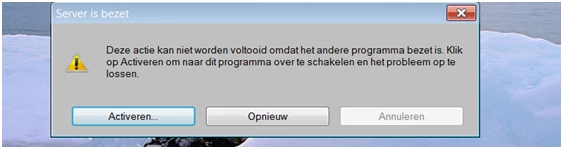
When I push 'activate (activeren)' nothing happens, pushing 'again (opnieuw)' also nothing happens.
My computer runs Windows 7 Home Premium.
Can you help me to solve this problem ?
Probably adobe flash player isn't completely removed ? But I don't see it anymore in 'Programs'.
Kind regards,
Theo Steenhuyzen
[moderator: personal information removed per forums privacy policy]

 AdChoices