

Sihadej
Participant
April 6, 2016
Question

Problems when right clicking while playing online games

  • April 6, 2016
  • 3 replies
  • 445 views

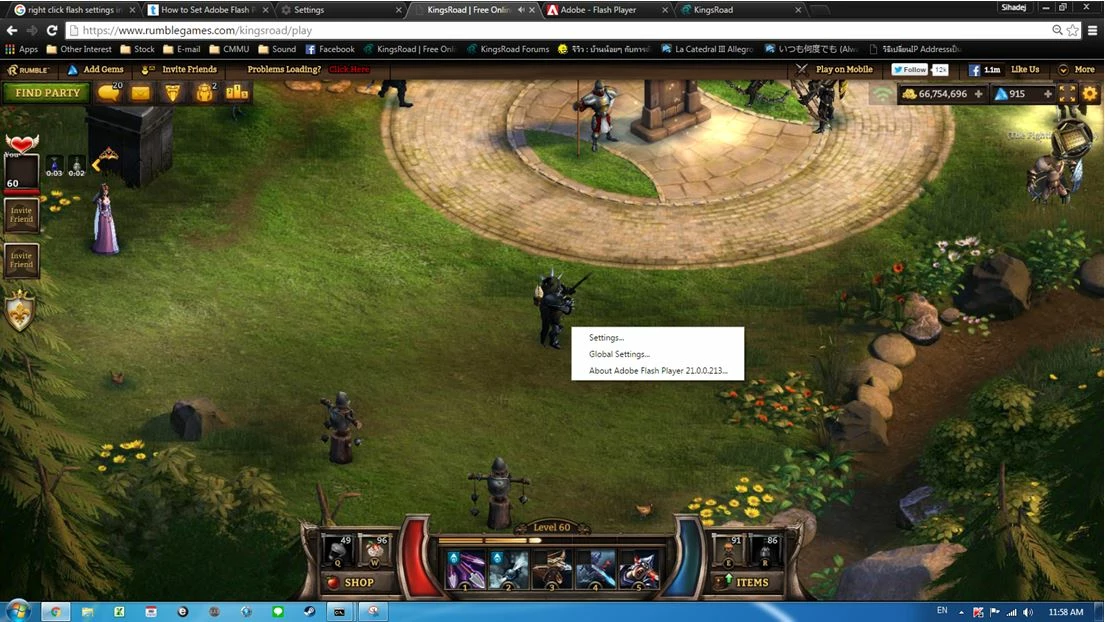
I got a problems when right clicking while playing online games & I don't know how to fix it.

I always get settings pop up every times right clicking, How can I solve this issue?


    This topic has been closed for replies.

    3 replies

    Participating Frequently
    April 12, 2016

    Hi,

    This issue is fixed in 21.0.0.216.Please update your chrome browser.

    Thanks

    _maria_
    Legend
    April 12, 2016

    Google released 21.0.0.216 as a component update.  If Flash Player hasn't been updated in your version of Chrome, please do the following:

    1. Launch Chrome
    2. Navigate to chrome://components
    3. Look for the pepper_flash entry
    4. Click the Check for updates button
    5. Flash Player version should be updated to 21.0.0.216

    --

    Maria

    jeromiec83223024
    Inspiring
    April 6, 2016

    Yeah, we introduced a bug that broke the ability for content to suppress the right-click context menu.  It affects Chrome only. 

    As a temporary workaround, use a different browser.  We're working on a fix, but we have no ETA at this time.

    April 6, 2016

    We have an application that needs to use chrome and has to have this context menu disabled.

    I have attempted using a system installed version of Adobe Flash Player 21 PPAPI off your archives, but it is not showing up as an option in chrome://plugins to enable it.

    Are there any other workarounds?

    _maria_
    Legend
    April 6, 2016

    Hi,


    Right-clicking in Flash gets you the context menu, which is what you're seeing.  The content developer can determine what options display in the context menu.  In this case, they are only exposing three options: Settings, Global Settings, and Flash Player version.

    --

    Maria
