
maksimg5990504
Participant
November 9, 2016
Question

Problems with playing .swf files in MS Edge 14 (Windows Anniversary update)

  • November 9, 2016
  • 1 reply
  • 2743 views

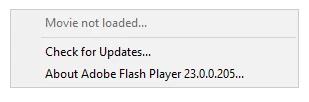
Hello Adobe community. I use flash shockwave components on my web-page (audio recorder and audio player) and there was no problem in any browser until windows anniversary update, where ms edge browser was updated to EdgeHTML 14 engine. The issue is: my swf components are not played at all and in right-click menu there is no options except grayed "Movie not loaded" (pic. below). Swf files are stored on the server and are taken through the https. I tried to replace my swf with another (using its url from the other host, due to http) and it's played with no problem. Flash components are wrote on ActionScript using ExternalInterface class to communicate with JavaScript.
This topic has been closed for replies.

1 reply

maksimg5990504
Participant
November 10, 2016

The problem was partly solved by correcting server's certificate (cn name did not match server's FQDN). All flash components are played normally now but only when connecting through server's FQDN. Connection via IP address still has the problem. It's very strange, because there was no any errors or warnings in the Edge's (anniversary update version) console and flash components in other browsers (including Edge 13) worked perfectly before the certificate correction.

It will be very helpful to hear any suggestions about the cause of the problem and ways to fix it in case of connection via server's IP address.

jeromiec83223024
Inspiring
November 14, 2016

While it sounds like assigning an IP to an SSL certificate is technically supported, compatibility varies, and there are a lot of caveats.  It's an edge case, and the recommendation would be to avoid the issue entirely and implement a server-side redirect to the FQDN, such that end-users are never in the position of using your site from the IP after the initial request.

In the case of the ActiveX control today, the host browser is making the decision about whether or not the certificate is legal.  Historically, Flash Player takes the position that we shouldn't ask end-users to make exemptions to security errors, so any requests with an invalid SSL certificate will fail.

There's some interesting background here, but like I said, it's technically allowed, but a path fraught with peril:
https://support.globalsign.com/customer/portal/articles/1216536

Securing a Public IP Address - SSL Certificates

Last Updated: May 09, 2016 01:28PM EDT

Introduction

An SSL certificate is typically issued to a Fully Qualified Domain Name (FQDN) such as "https://www.example.com". However, some organizations need an SSL certificate for a public IP address. GlobalSign offers support for IP addresses on SSL certificates both in the common name and Subject Alternative Name (SANs) fields.

Ordering and Compatibility

Public IP addresses are supported on GlobalSign's OrganizationSSL certificates. Other variations, such as DomainSSL and ExtendedSSL, do not support the securing of an IP address. While an IP address can be specified as a common name or as a Subject Alternative name, there are compatibility factors that should be taken into account before deciding how to order.

If you are targeting Windows 10 and later, you can populate the IP address in either field. If however, you are targeting Windows 8.1 and earlier, you should only specify the IP address as the common name.

In order to maintain compliance with RFC 5280, subject alternative names have a value that specifies the content type. For example, a SAN for www.example.com would be specified as dNSName and a SAN for 123.456.78.90 would be specified as iPAddress. Proper handling for the iPAddress SAN type was added in Windows 10, versions prior to this will not process iPAddress SANs properly.

For this reason, if you need to target Windows versions prior to 10, order the certificate with the desired IP address as the common name; earlier versions of Windows will validate from the common name instead of the iPAddress SAN entry.

Note: Only public IP addresses can be used on OrganizationSSL certificates. You must be the owner of the public IP address as per the records held with the RIPE Network Coordination Centre (NCC). Internal IP addresses may be secured with GlobalSign's IntranetSSL certificates.

maksimg5990504
Participant
November 15, 2016

Hi jeromiec83223024!

Thanks for your advice! I will try it.