
Participant
January 30, 2017
Question

Rendering Issues with Flash 24 and Firefox 51.0

  • January 30, 2017
  • 2 replies
  • 1513 views

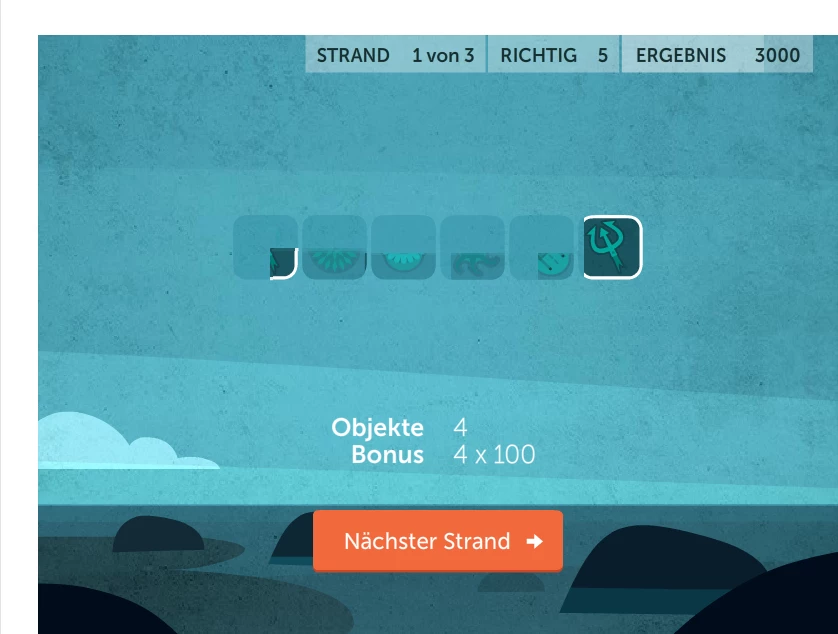
With the recent release of Firefox 51.0 our customers are complaining about rendering issues in our Flash games.  Visuals have teariing, could be a vsync issue.

We've repro'd on:

Firefox 51.0, Flash 24.0.0.194, Windows 10 on a Dell XPS w01a

Firefox 51.0, Flash 24.0.0.194, Windows 7, Lenovo X1 Carbon Thinkpad

Interesting to note that both these PC's have touch screen displays.

Note the values in the score are rendering incorrectly:

in this screen, the icons are not rendering correctly:
    This topic has been closed for replies.

    2 replies

    Participant
    February 4, 2017

    As part of testing a related issue, I was able to reproduce this bug as well.  It happens in Firefox 51, on Windows, when using a Hi-DPI display, and when the wmode of the Flash Movie is set to transparent.  Any content updated dynamically by Flash Player (without a full redraw) may be distorted.

    There are other problems in wmode transparent and opaque in this configuration which include problems with background timer events, the context menu stalling all timers,  and erratic behavior of Flex form elements (i.e. radio buttons/checkboxes will sometimes not work or select/deselect the wrong element).

    If you set the movie to wmode window, or set the DPI scaling to 100%, or use a different browser... you won't have these problems.  It's just this specific combination of factors that seems to break things.

    I filed a bug FP-4198244 that described the various issues we found, but for now we're telling our customers to avoid using Firefox 51 on Hi-DPI displays because of all the problems.

    shasimo
    Inspiring
    February 8, 2017

    Thanks for the wmode tip - that saved my day!

    I have the problems with all my swfs in Firefox. In my current project, just started up, I couldn't get the radiobuttons to work. In older projects simplebuttons had to be clicked twice and the changes that should occur, did not happen until I clicked on something again. Text are being cut of and is rendered as without antialiasing.

    I discovered that running the swf in the browser without HTML solved all problems, but that is not really a solution...
    Also it seemed like the <embed src="myswf.swf"> worked better than the <object> way of placing an swf in HTML, but that is of cause because of the parameters not being included.

    jeromiec83223024
    Inspiring
    January 31, 2017

    Yeah, that's definitely odd.  It's probably a Firefox bug, but we can debug it and provide an analysis and file the appropriate bug(s) as needed.

    If the users disable hardware acceleration, does the problem go away?

    Instructions can be found here:

    https://helpx.adobe.com/flash-player/kb/video-playback-issues.html

    Also, please feel free to file a bug here: https://tracker.adobe.com/

    A URL and steps to reproduce the problem would be helpful, as would a dxdiag report from an affected machine (those instructions are also in the video troubleshooting guide, above).  I might have an X1 Carbon laying around in a file cabinet, but just getting a good read on what chipset(s) and driver versions are in play will be useful for tracking down machines that might reproduce it, and/or narrowing down the suspect code for whoever ultimately ends up working on the bugfix.

    If you post a bug ID back here, I'll get an email notification and will escalate it.

    Thanks!

    Participant
    February 2, 2017

    I am seeing similar issues across several Flash Games ( DICEWARS - flash game and Royal Story on Facebook | Facebook ).

    I am on an Acer Aspire V3-572G-73Q8 laptop with NO touch screen, but have Windows 10 set to 175% scaling in Display Settings (Win 10 Settings App).

    Seeing similar issues to the visual above as well as slow line by line updating and objects (especially UI) appearing larger or smaller than in the last version of Flash Player or appearing pixelated.

    Changing hardware acceleration (either in Flash Player or forcing via nVidia driver) does not help

    I can also provide a dxdiag and/or separate bug report if needed.

    jeromiec83223024
    Inspiring
    February 2, 2017

    Just to confirm, you're also talking about Firefox, right?  Do you see the same problem in other browsers, or just Firefox?