Participant
February 15, 2011
Question

Required file could not be written due to insufficient permisions????

  • February 15, 2011
  • 2 replies
  • 1796 views

I am running a Toshiba X205 on Windows 7. I have used Flash for 2 years with no issues and recently my flash player crashed. I uninstalled flash through the system32/macromed/flash file. I did have both activeX and the plugin version installed but only the activeX version would uninstall. When I go to re-install I receive this error message.
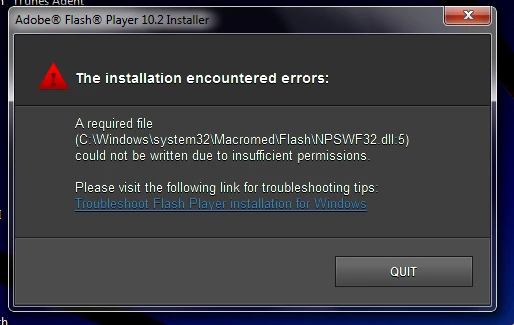
The file NPSWF32.dll is in the flash folder but I am unable to remove it, along with a flashplayer.xpt file and a Flashutil10m_plugin apllication.

Ive tried everything I can, please help! Thanks!

    This topic has been closed for replies.

    2 replies

    February 16, 2011

    Hi, When Uninstalling Flash Player prior to Installing any new version it is best to use the Adobe Uninstaller. You might want to try the following. Many times that error would mean you didn't use the Administrator Account and didn't have Permission to Install for some reason. I would try this first and see if it is successful.

    Download and SAVE to your Desktop the Uninstaller:

    http://kb2.adobe.com/cps/141/tn_14157.html


    Download and SAVE to your Desktop the Installer for IE- use the EXE Installer

    http://www.adobe.com/products/flashplayer/fp_distribution3.html

    Download and SAVE to your Desktop the Installer for FF- use the EXE Installer for plugin based (from the same site)

    Close all browser windows, you only want to be looking at your Desktop.

    Disable any messenger services, as yahoo, msn, etc in the system tray(area near the clock)

    Disable any Anti-Virus/Spyware programs

    Be sure to use the Administrator Account.

    Run the Uninstaller and when finished, Reboot(restart) your computer.

    Now check and make sure the Anti-Virus/Spyware programs are still Disabled.

    Run the Installer for IE, Run the Installer for FF and when finished, Reboot.

    Then go to this test site and test each browser:

    http://www.adobe.com/software/flash/about/

    You may want to print these instructions to make it easier to follow. If you have any questions, let me know.

    Thanks,

    eidnolb

    Participant
    February 15, 2011

    This is a 32 bit system if that makes any difference.