Participant
December 17, 2013
Answered

Safari will not enable Flash Player.

  • December 17, 2013
  • 1 reply
  • 1777 views

I have installed, uninstalled, rebooted, checked forums, and followed all the instructions. I have a Mac operating OS X Mavericks and cannot use Adobe Flash Player. When I select Safari>Preferences>Security, There is no option for me to select "allow all other plug-ins" I have JavaScript enabled but there is no check box to enable Flash Player. I would very much like to access YouTube on my new Macbook Pro. Any help will be appreciated.

Thanks,

Dom

This topic has been closed for replies.
Correct answer C_F_McBlob

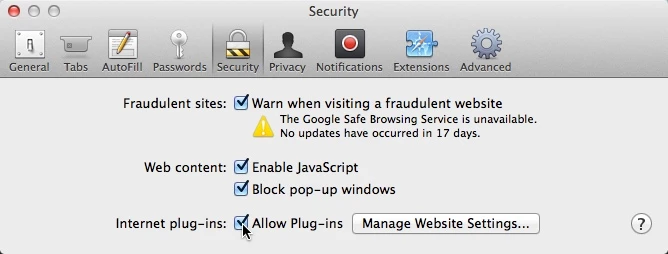
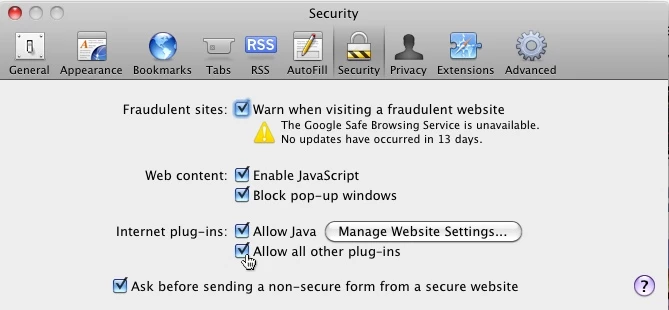
Dom, the Preferences>security appears different between versions.

Safari 7 (Mavericks) or Safari 6 (Mt. Lion)

Safari 5 (Snow Leopard)

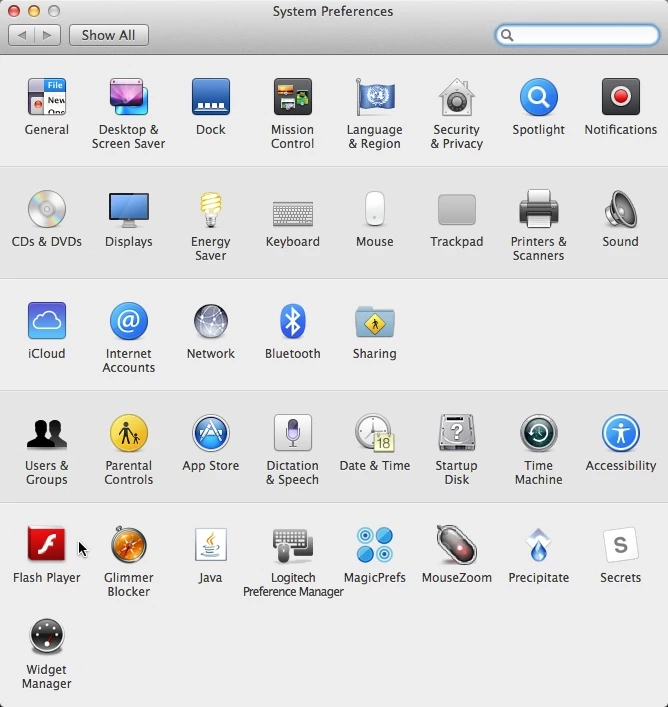
Check your System Preferences to be sure it's installed.

1 reply

C_F_McBlob
C_F_McBlobCorrect answer
Inspiring
December 17, 2013

Dom, the Preferences>security appears different between versions.

Safari 7 (Mavericks) or Safari 6 (Mt. Lion)

Safari 5 (Snow Leopard)

Check your System Preferences to be sure it's installed.

Participant
November 3, 2014

Mike -

That was EXACTLY it for me.

What a frustratingly poor feedback dialog from Apple, and thanks for showing what was going on behind the curtain.

Much appreciated!