
Inspiring
January 29, 2017
Answered

Scam Flash Updates in Chrome?

  • January 29, 2017
  • 2 replies
  • 2319 views

I keep getting these "ADOBE FLASH PLAYER SOFTWARE MAY BE OUT OF DATE" pop ups in Chrome (Version 56.0.2924.76 (64-bit)) and OS-X 10.11.6 about 1-2 times a day.
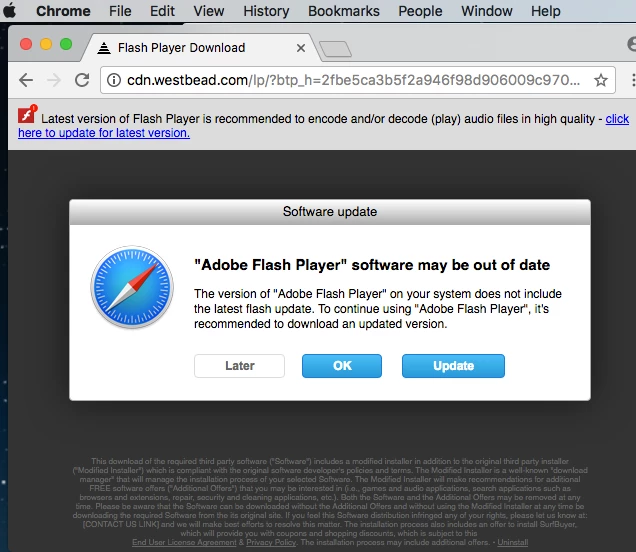
Update URL points to cdn.westbead (.) com  -- is this a scam website?

But OSX System Preferences> Flash Player says I'm up to date -- what gives?
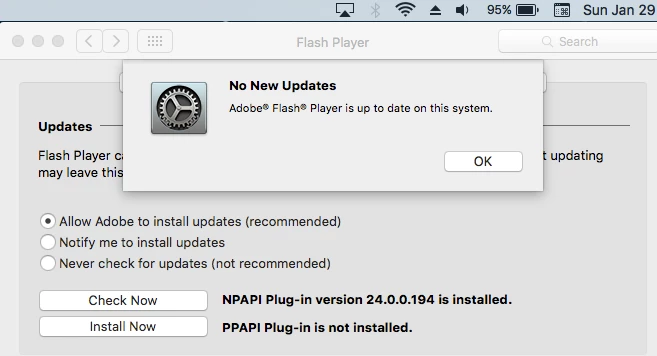
Chrome is a default install -- any ideas on what's triggering this spam?

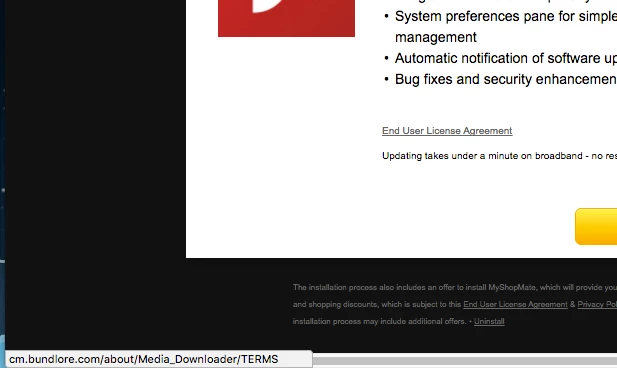
"End User License Agreement" License and Privacy, Uninstall links all point to cm.bundlore (.) com
    This topic has been closed for replies.
    Correct answer Julian Ball

    It’s certainly not coming from Adobe. What does the small print at the bottom of the screen say? Something about SurfBuyer…? Do you have any extensions with that name installed? A search online suggests that this is some sort of adware.

    I hope that helps!

    Julian

    2 replies

    _maria_
    Community Manager
    Community Manager
    January 31, 2017

    You can also forward a screenshot, and full URL (if you have it) to phishing@adobe.com.  Adobe does take these issues seriously and follows-up on them.

    Julian BallCorrect answer
    Adobe Employee
    January 30, 2017

    It’s certainly not coming from Adobe. What does the small print at the bottom of the screen say? Something about SurfBuyer…? Do you have any extensions with that name installed? A search online suggests that this is some sort of adware.

    I hope that helps!

    Julian

    Inspiring
    January 30, 2017

    Julian Ball

    Thanks for the affirmation,

    I looked around a bit more after posting and even saw an Adobe employee note on your forum that Chrome installs its own "Flash Player" -- who can tell anymore these fake Adobe installers or what gets installed -- they look so convincing until you start checking the links and small print???

    I'm glad I ran the real Adobe Flash Player installer from OSX System Preferences for a moment's pause to this fake Flash Player update ... no add on extensions (I checked Chrome), also some User/System Library folders mentioned on various tips pages.

    Adobe Employee
    January 31, 2017

    Glad the feedback helped! I can't be sure if the problem comes from something in Chrome itself or some external component, but if the messages come back in future you might want to try creating a new user profile in Chrome (in the People menu) and switch to using that to see if that eradicates it completely.