
Participant
June 16, 2010
Question

Screen Split and Divided By A Green Line

  • June 16, 2010
  • 2 replies
  • 9814 views
  • Window XP 64bit
  • Firefox 3.6.3 32bit
  • Flash Player 10.1.53.64

I updated my Flash Player 2 days ago.  Now when I watch videos it is split into 2 displays in the middle by a green line, as shown by this screenshot.
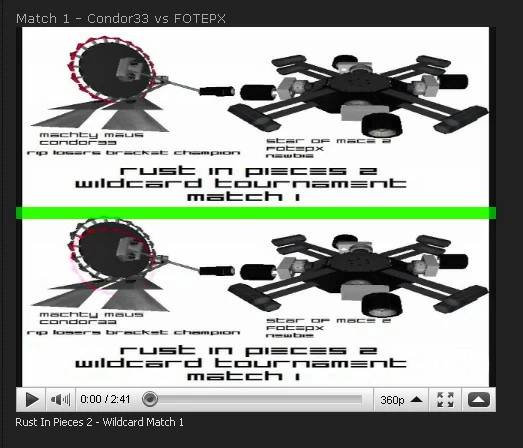
How do I fix this so only one display show up?  I have already tried reinstalling and hardware acceleration setting, and neither help.

    This topic has been closed for replies.

    2 replies

    Participant
    February 11, 2011

    I found a solution. Find the latest update for your video card. It fixed the issue you spoke of.

    pwillener
    Legend
    June 16, 2010

    This topic http://forums.adobe.com/thread/658909 shows the same problem.

    Disabling hardware acceleration partially fixed the problem, but not completely.

    The only more thing I can think of is to try find a newer driver for your graphics card.

    Short of that: file a bug report at https://bugs.adobe.com/flashplayer/

    pwillener
    Legend
    June 16, 2010

    Found that this had already been reported at https://bugs.adobe.com/jira/browse/FP-3749

    Updating the graphics/video card driver fixed the problem.

    Participant
    June 21, 2010

    I had the same problem!

    I can confirm that updating GPU driver dose fix it.

    What im running:

    Operating System: Windows XP Professional x64 Edition (5.2, Build 3790) Service Pack 2 (3790.srv03_sp2_gdr.100216-1301)
    System Manufacturer: XFX78I
    System Model: XFX nForce 780i 3-Way SLI

    Processor: Intel(R) Core(TM)2 Quad CPU Q6600 @ 2.40GHz (4 CPUs), ~2.4GHz
    Memory: 4094MB RAM
    DirectX Version: DirectX 9.0c (4.09.0000.0904)

    Video Card(s): 2 - BFG 9600 GT OC in Dual SLI

    Browser: Internet Explorer 8 updated 6/11/2010