


Silent Auto Update telling some users they must have administrative privileges to install
- Operating system version
- Windows 7 x64
- Web browser and version
- IE 11 v 11.0.9600.18282
- Flash Player version
- 22.0.0.192
- 22.0.0.209
- Explain your problem in step-by-step detail if possible
In our environment a few users have received the following popup message:
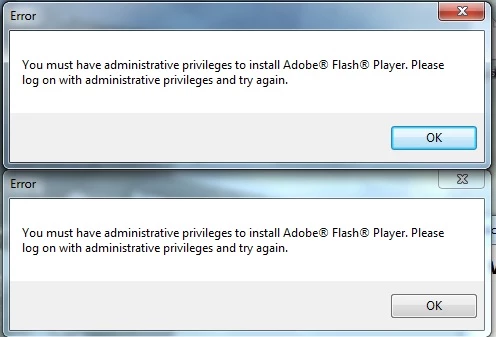
We recently went through the silent auto updating of Flash 22.0.0.192 to 22.0.0.209 when the users experienced the message. Users would close the popup boxes and it appears eventually flash would upgrade in the background.
Our environment is currently configured to use silent auto updating. Here is the contents of our mms.cfg:
AutoUpdateDisable=0
AutoUpdateInterval=3
SilentAutoUpdateEnable=1
SilentAutoUpdateServerDomain=flash.update.server.address
ThirdPartyStorage=0
Here is the contents of FlashInstall.log:
=O====== M/22.0.0.192 2016-06-16+20-16-10.474 ========
0000 00000010 FlashPlayerInstaller.exe -install -iv 9
0001
0002 00000011 1
0003 00000020 C:\windows\SysWOW64\FlashPlayerCPLApp.cpl
0004
0005
0006 00000013
0007 00000015 C:\windows\SysWOW64\Macromed\Flash\FlashUtil32_22_0_0_192_ActiveX.exe
0008 00000016 C:\windows\SysWOW64\Macromed\Flash\FlashUtil32_22_0_0_192_ActiveX.dll
0009 00000023 C:\windows\SysWOW64\Macromed\Flash\activex.vch
0010 00000019 C:\windows\SysWOW64\FlashPlayerCPLApp.cpl
0011 00000021 C:\windows\SysWOW64\Macromed\Flash\FlashPlayerUpdateService.exe
0012 00000012
=X====== M/22.0.0.192 2016-06-16+20-16-15.763 ========
2016-7-13+23-6-18.894 [error] 1226 1062
=O====== M/22.0.0.209 2016-07-13+23-06-14.414 ========
0000 00000010 FlashPlayerInstaller.exe -install -iv 9
0001 00000011 1
0002 00000020 C:\windows\SysWOW64\FlashPlayerCPLApp.cpl
0003
0004 00000018
0005
0006 00000013
0007 00000015 C:\windows\SysWOW64\Macromed\Flash\FlashUtil32_22_0_0_209_ActiveX.exe
0008 00000016 C:\windows\SysWOW64\Macromed\Flash\FlashUtil32_22_0_0_209_ActiveX.dll
0009 00000023 C:\windows\SysWOW64\Macromed\Flash\activex.vch
0010 00000019 C:\windows\SysWOW64\FlashPlayerCPLApp.cpl
0011
0012
0013 00000021 C:\windows\SysWOW64\Macromed\Flash\FlashPlayerUpdateService.exe
0014
0015
0016
0017 00000012
=X====== M/22.0.0.209 2016-07-13+23-06-20.224 ========
What would cause this message for some users and not others ?

 AdChoices