
March 7, 2017
Answered

Software can't identify flash player

  • March 7, 2017
  • 2 replies
  • 1084 views

Hey,

I am using windows 7 pro.

I have no problems with flash player while using chrome, in fact I have checked many times and the latest version of flash player is installed and running. but the problem I'm facing is with a software that I have installed that needs flash player to run but fails to recognize that this computer has it. despite my chrome browser saying I have Flash 24.0 and it is enabled.

the software is an examination software by the British council, and when I open it I get the following messages
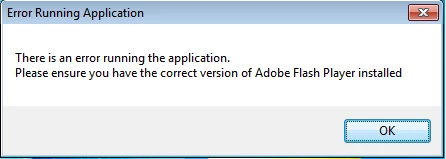
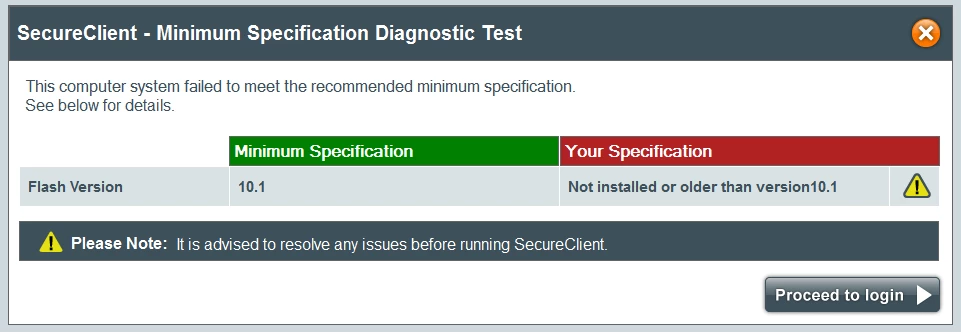
Is there another version of flash player that I need to download ?

    This topic has been closed for replies.
    Correct answer _maria_

    Hi nadeemh56950177​,

    Is this the link to the software you are attempting to use: System requirements | IELTS practice and preparation from the British Council: Road to IELTS ?

    Is this web-based app or software you install?

    Have you tried using one of the other browser combinations listed on the system requirements?

    Google embeds Flash Player in Chrome, it's possible the application is not detected the embedded version.  You can try installing Flash Player PPAPI by doing the following:

    1. Launch your browser and navigate to https://helpx.adobe.com/flashplayer/otherversions
    2. In step 1 select Windows 7/Vista/XP
    3. In step 2 select FP 24 for Opera and Chromium - PPAPI
      1. Note the optional third-party offers on the page
    4. Click the Download Now button
    5. Locate the downloaded installer file and double-click it to launch the installer
    6. Follow on-screen prompts to install Flash Player

    --

    Maria

    2 replies

    _maria_
    _maria_Correct answer
    Legend
    March 7, 2017

    Hi nadeemh56950177​,

    Is this the link to the software you are attempting to use: System requirements | IELTS practice and preparation from the British Council: Road to IELTS ?

    Is this web-based app or software you install?

    Have you tried using one of the other browser combinations listed on the system requirements?

    Google embeds Flash Player in Chrome, it's possible the application is not detected the embedded version.  You can try installing Flash Player PPAPI by doing the following:

    1. Launch your browser and navigate to https://helpx.adobe.com/flashplayer/otherversions
    2. In step 1 select Windows 7/Vista/XP
    3. In step 2 select FP 24 for Opera and Chromium - PPAPI
      1. Note the optional third-party offers on the page
    4. Click the Download Now button
    5. Locate the downloaded installer file and double-click it to launch the installer
    6. Follow on-screen prompts to install Flash Player

    --

    Maria

    March 9, 2017

    Thank you Maria

    That was really helpful, it is working perfectly fine now

    _maria_
    Legend
    March 9, 2017

    You're welcome.

    --

    Maria

    Participating Frequently
    March 7, 2017

    Following link might be helpful.

    Adobe Flash isn't working - Chrome Help

    Thanks

    March 7, 2017

    Actually I followed all the directions on that page before I posted my question, but as I said I am not facing any problems while using google chrome. Only with the other application