
October 14, 2011
Question

some videos & streaming sites not working pink background

  • October 14, 2011
  • 7 replies
  • 6642 views

youtube and most sites work fine

but the odd few dont
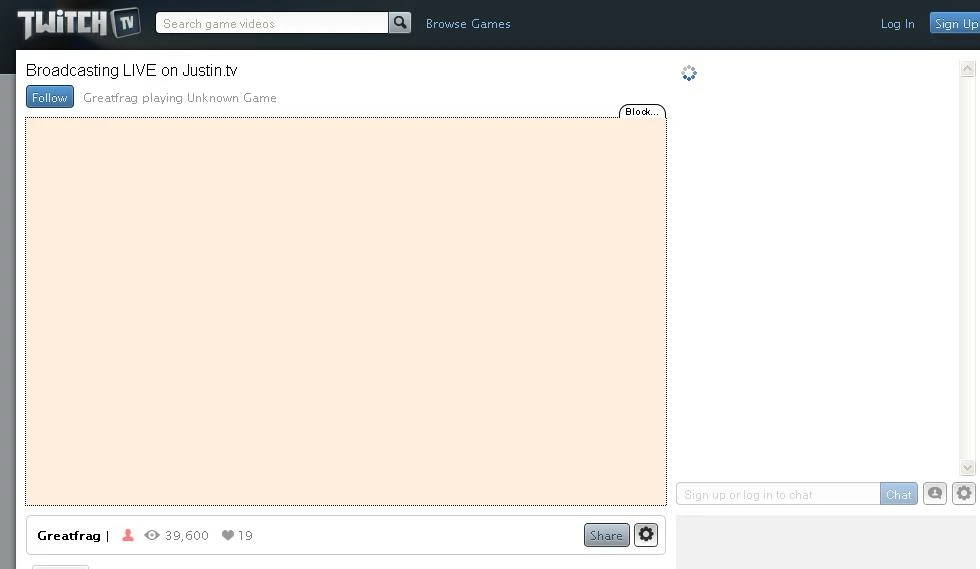
here is what i see

using xp flashplayer upto date

tried turning off addblock nothing happend

any ideas?

any help will be appreciated

    This topic has been closed for replies.

    7 replies

    Participating Frequently
    November 3, 2011

    Rembizzel, I have no idea if you'll still check here or not but in the last two days I've migrated from Firefox to Chrome due to the videos that were playing were playing choppily and getting worse (after some research I discovored that Firefox has memory leak issues on Win7 apparently). Anyway, I no longer have this problem with Justin/Twitch.TV. It's very strange. Both IE and Firefox were affected. I have no addons on IE and only ever use it as a backup for troubleshooting, and Firefox wouldn't work with or without addons. I can't explain it but I'm happier than ever with Chrome at the moment. The migration was painless and after two days of use and a little google research I have Chrome customizedto my tastesand am maybe happier than I was with Firefox. Anyway, just wanted to throw that out there as a possibility you may want to consider.

    October 26, 2011

    so....?

    fpMonster
    Adobe Employee
    Adobe Employee
    October 26, 2011

    Since I can't help any further please file a bug here: http://bugbase.adobe.com/ to get further investigation

    Participating Frequently
    October 20, 2011

    I am having the exact issue. That orange/pink square is where my video should be and neither video nor chat will load on Justin.tv or Twitch.tv. This seems to be the only site I've found to be problematic.

    It's been at least a couple of weeks now I think with no changes to my system that I can recall. I've done the usual troubleshooting nearly every other day since the problem began (uninst/reinst, make sure i was updated, try old version, firefox in safe mode, try alternate browser...) and nothing has worked.

    I used to stream these sites fine and really could not tell you why all of a sudden I'm experiencing the issue, and like I said, I don't recall any changes to my system.

    Please help!

    Participating Frequently
    October 20, 2011

    Also sent along my dxdiag report just now. Hope you guys can help! This is driving me crazy.

    fpMonster
    Adobe Employee
    Adobe Employee
    October 20, 2011

    Hi mem0ryburn,

    Can you go download the latest graphics driver for your system and update it. Please let me know if you still have issue after that.

    Thanks

    October 18, 2011

    any progress?

    fpMonster
    Adobe Employee
    Adobe Employee
    October 19, 2011

    We are still unable to reproduce, making it difficult to investigate.

    October 20, 2011

    iv been serching for errors on other sites found a porn site thats not working right will i post the address?

    this is what it looks like on viewing a video

    note its all flashing aswell

    Error: Error #2134: Cannot create SharedObject.

        at flash.net::SharedObject$/getLocal()

        at SampleFlvFlvvideoClass/createSoundMethod()

        at SampleFlvFlvvideoClass()

        at SampleFlvRootstartClass()

    October 17, 2011

    download debugger

    here is what i get

    this is what comes up initially

    Error: Error #2134: Cannot create SharedObject.

        at flash.net::SharedObject$/getLocal()

        at CookieJar()

        at boot_44ee/init()

        at flash::Boot/start()

        at boot_44ee()

    then a few secs later this

    Error: Error #2134: Cannot create SharedObject.

        at flash.net::SharedObject$/getLocal()

        at CookieJar()

        at PersistentData$/getUniqueId()

        at Stat$/log()

        at Chat/connect()

        at Chat/establishConnection()

        at Function/http://adobe.com/AS3/2006/builtin::apply()

        at flash.external::ExternalInterface$/_callIn()

        at Function/<anonymous>()

    fpMonster
    Adobe Employee
    Adobe Employee
    October 17, 2011

    rembizzel,

    I thought it was as a video card problem but looking at your system's spec it seems like you have a pretty recent update. I don't have the exact video card, but I setup a system with nVidia GTX 240 card running on Windows XP and was able to watch the video fine.

    The ActionScript Errors that you see above is that also from watching a stream at www.twitch.tv? Or a different link? please post link

    Can you double check that to see if there's any new update for your video card driver?

    Is your machine laptop ?

    meanwhile, still trying to figure out your problem..

    October 17, 2011

    "The ActionScript Errors that you see above is that also from watching a stream at www.twitch.tv? Or a different link? please post link"

    i got the error on every stream on twitch i tried witch was a lot.

    heres a link to 1 http://www.twitch.tv/naslseasontwo

    my drivers are upto date im sure

    not a laptop

    also im running dual monitors but i doubt that would affect this?

    is there is any thing more i can do on my side to help diagnose this?

    thank you for your efforts

    October 16, 2011

    ....

    fpMonster
    Adobe Employee
    Adobe Employee
    October 14, 2011

    Double check that the version is 11.0.1.152 : http://www.adobe.com/software/flash/about/

    What browser are you using?

    Can you provide your system info?

    (Start -> Run -> dxdiag -> Save All info as text file) Send info to (csy@adobe.com)

    Thanks

    October 14, 2011

    yes i have 11.0.1.152 it was happening before i updated also

    firefox & chrome

    sent that

    pwillener
    Legend
    October 15, 2011

    Does it improve if you disable Hardware Acceleration (http://forums.adobe.com/thread/891337).